
Architecture · 14 min read
Breaking the glass
Every platform team gets the pod exec finding, and every attempt to remove exec meets the same pushback. How I kept the capability in Tower and locked it down: a debug container instead of exec, no credential for anyone, a second person on production, six admission policies, a recording of every byte, and an honest grade of how secure it really is.
Sooner or later, every platform team gets the finding. It's usually a line in a security review that says
something like "interactive shell access to production workloads". Production allows
kubectl exec. Developers use it. The ops team uses it. Everybody uses it, all the time, because
it's the fastest way to find out what a pod is actually doing.
I've been on the receiving end of that finding. In a previous role, one of my jobs on the DevOps team was to sit down with the security team, go through their findings, and work out what we'd do about each one. We ran a read-only GitOps model: every change to production was a reviewed commit, and nobody wrote to a cluster by hand. Pod exec was one of the very few exceptions, and it always came up. It would have been lovely to just turn it off. Except you already know what happens next. The first incident after you do, someone needs to look inside a pod, and the pushback arrives all at once.
So the real question was never "should we allow exec?" It was this: how do you keep the capability people genuinely need, and lock it down so well that the security team is happy to sign it off? On October 10 and 11, 2026, I built my answer into Tower. It's called break-glass, and this essay is about how it works, the guardrails that make it safe, and an honest grade of how safe that actually is.
Why you can't just turn it off
Logs, metrics, events and a good resource view answer most questions. Not all of them. Sometimes you need to see which processes are running and what they're holding open, resolve a name from inside the pod's network, try a TLS handshake to a dependency, or read the config file the app actually received rather than the one you think it did. That's real work, and it tends to happen at the worst possible moment.
Take the capability away with nothing in its place, and it doesn't disappear. It moves. Someone keeps a cluster-admin kubeconfig on a laptop "for emergencies", and now you have the same shell with none of the controls. That's the opposite of the fourth of my principles, paved roads with security built in. The safe way has to be the easy way, or people won't take it.
The safe path has to be the easy one, or people will find another.
Swap exec for a debug container
The first decision is the one everything else rests on: Tower never offers exec. It offers a shell in a Kubernetes ephemeral debug container instead, added next to the app.
The difference matters to the API server. Exec arrives as a single request, CONNECT pods/exec,
and an admission policy can only allow it or deny it. A debug container arrives as a full container spec:
the image, the user, the capabilities, the mounts. Every one of those fields is something the cluster can
check before it says yes. Exec is a door you can lock or unlock. A debug container is a request the cluster
can read.
It also works better for the person using it. A distroless app image has no shell at all, so exec gets you
nothing. Tower's debug image is the same everywhere: a small Alpine image with curl,
openssl, dig, ss, ps, jq, a PostgreSQL client
and redis-cli. It's built in the tower repo, signed keylessly with cosign, and pinned by digest.
A few tools are left out on purpose: ping, tcpdump and strace all need
Linux capabilities that every debug container drops. Allowing them would be a policy decision, not an image
one.
There are two modes. A copy of the pod is the default: a new pod built from the live pod's spec, with none of the labels a Service selects, so it carries no traffic. You can even hold the app in the copy, which keeps its image, config and credentials but runs a sleep instead of the app, so a queue consumer doesn't start eating real messages. The live pod mode adds the debug container to the running pod, for the questions only that pod can answer, like a hung connection. Two more options widen what a session can see, and both are opt-in and written on the record: process access shares the app container's process namespace, and volume access mounts the app's volumes read-only.
I want to be careful here, because a debug container isn't safe by nature. Run as the app's user with the process namespace shared, it can read the same secrets exec could. That's exactly why process access is a separate checkbox, shown to the approver and kept on the record.
Nobody gets a credential
The second decision is about identity. When you press Debug, you never get a Kubernetes credential. Not a kubeconfig, not a token, nothing to copy or leak. Your browser only ever talks to Backstage.
Backstage doesn't hold debug rights either, at least not at rest. Its only standing right in an app namespace is to create RoleBindings to two roles, one for each mode. When a session opens, it binds one of them to itself, in that one namespace, with an expiry label. Then it adds the debug container, attaches to it, and relays the terminal to your browser over a WebSocket, recording every byte in both directions. When the session ends, it restarts the pod (a pod can't shed an ephemeral container), deletes the binding, and stores the recording. Just-in-time permission, granted to itself, for minutes.
A small detail I like: Backstage learns its own identity on each cluster by asking the API server who it is
(a SelfSubjectReview), because that identity differs from one cluster to the next. A hard-coded
name would quietly grant nothing.
Ground and Flight
Hangar splits environments into two tiers. Ground is dev and the throwaway pull request previews. Flight is staging and production. On Ground, an owner of the app opens a session straight away. On Flight, someone else has to say yes first.
The tier is never something the request gets to claim. Tower's backend works it out on the server: a preview
namespace is Ground; otherwise the app's own cicd.yaml decides; and an environment it doesn't
name takes its cluster's tier, where anything other than the dev cluster is Flight. A cluster added tomorrow
and not yet listed is Flight, the stricter one.
The approver can be any other owner of the app, or an admin, and they see exactly what was asked for: the mode, process and volume access, the duration, the reason, the incident link, the image the pod is running, and whether the session is sensitive. They judge it the way they'd judge a production change. Is the reason specific? Would a log line answer it? Is a copy enough, or does it really need the live pod?
Two details make the approval mean something. Nothing touches the cluster until the requester presses Start, within ten minutes of the approval, so an approval is never a standing pass. And the cluster checks the approval too: on Flight, the grant has to name an approver who isn't the requester, or it's refused.
Then there's the case everybody asks about in the design review: production is down and nobody else can be reached. An admin can break the glass and start a Flight session with no second person. I went back and forth on whether it should exist at all, because it's the weakest link. In the end I kept it and made it as loud as I could. Everyone gets a critical notification before anything is even tried, so a failed attempt is heard too. The grant is marked in the cluster. And the session is "review due" from the moment it opens, until someone who could have approved it watches the recording and signs it off, with a reminder at a day and an escalation at three. Breaking the glass should be your only hope, not your first one.
See it in Tower
Here's the whole thing from the inside: a production request, the approval, a live session, the end of it, the recording, and a broken glass being reviewed.

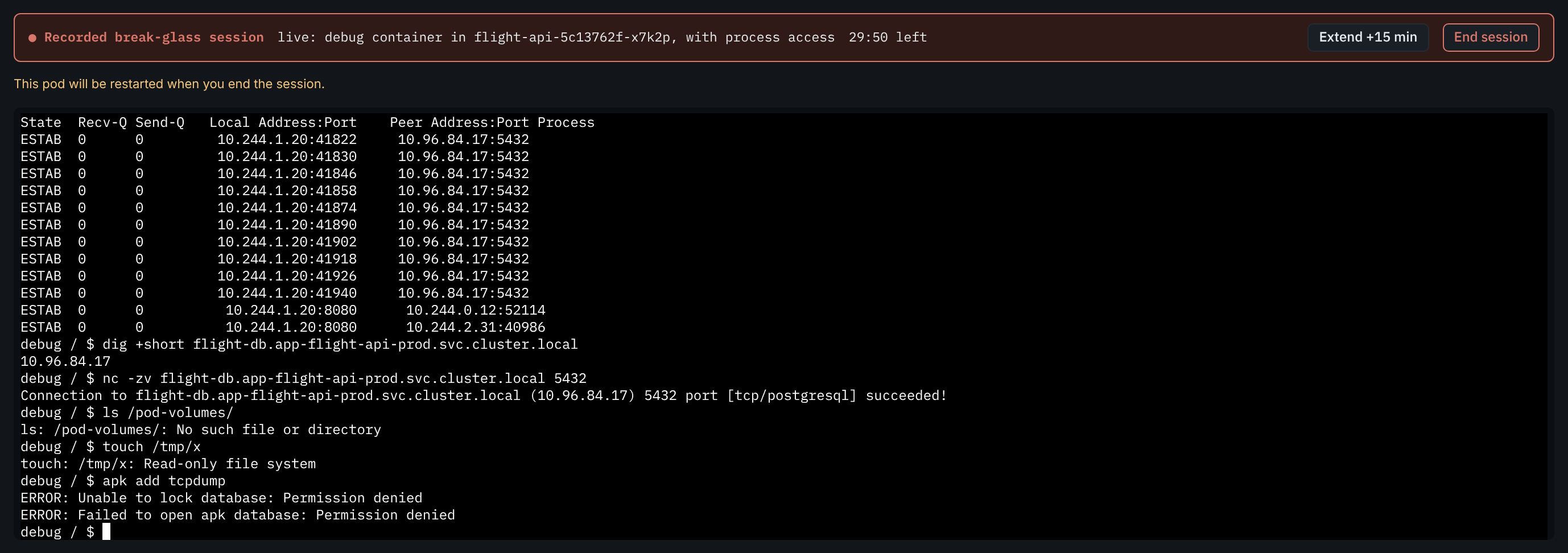
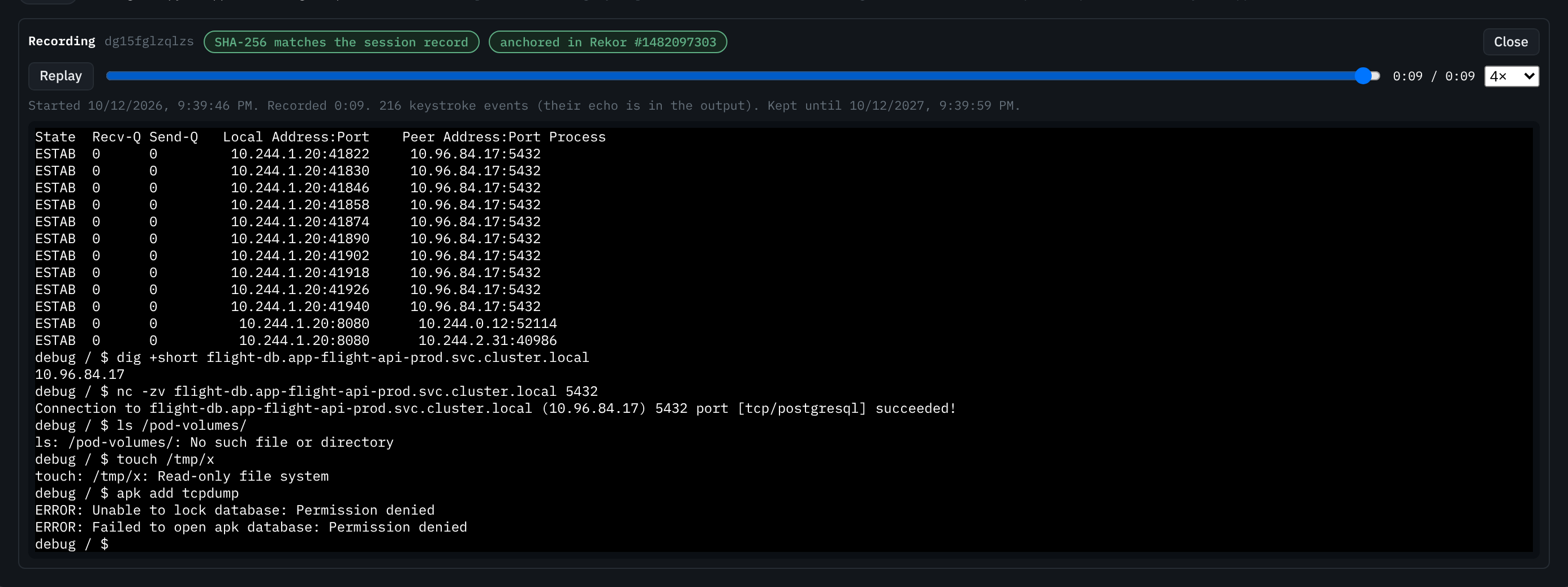

A few things worth noticing. The form asks for the least you need: a copy before the live pod, process and volume access unticked, fifteen minutes before sixty. Inside the session, the red banner never goes away, the countdown is always there, and you get one free fifteen-minute extension, after which it's a new request. And when you try to change anything, you can't: the root filesystem is read-only, there's no root to become, and nothing to install. That's not a missing feature. It's the point.
The guardrails, layer by layer
This is the part a security team actually cares about, so it's the part I spent the most time on. A shell inside a production pod is the most powerful thing Tower offers. No single check is trusted with it. Each layer assumes the one before it might fail.
The first three layers live in Backstage. Tower's UI only shows you what you may do, but that's a convenience, never a control: every route checks again. Backstage's permission framework decides who may request, approve, break the glass or end someone else's session. And the backend's own rules handle what a permission can't express: you can't approve your own request, you can hold one open session at a time, the pod has to be running, and the namespace's own labels have to name the app and environment you asked about.
Layers four to six are the cluster refusing to take Backstage's word for any of it. That's where the admission policies come in.
There are six, and each one exists because I could name a way the layer above it might go wrong.
- rolebinding is the only grant Backstage may create: the right name, one of the two debug roles, Backstage as the only subject, an app namespace, and an expiry of fifteen to seventy-five minutes (a session plus its one extension). On Flight it also needs a distinct approver, or the glass-broken mark, never both and never neither.
- debug-container checks every debug container: the exact pinned digest, non-root with a non-zero group, a read-only root, no privilege escalation, all capabilities dropped, every mount read-only. Process access is admitted only for the session the pod's own annotation names, so a backend bug can't add process access an approver never saw.
- debug-image checks the signature: the image must carry the keyless signature of the tower repo's own build workflow, on main. The digest says which build; the signature says where it came from.
- pod-delete exists because both debug roles can delete pods for the length of a session. Without it, a grant meant for one pod would reach every pod in the namespace. With it, Backstage can delete a copy pod or a pod carrying a debug container, and nothing else.
- pod-annotate limits Backstage's pod patch to the single process-access annotation. The spec and the labels can't change.
- no-exec is the one that closes the original finding. On Flight, the cluster refuses exec into any app namespace for everyone but platform operators, and attach only works on a debug container. "Never exec in production" stops being a convention and becomes a cluster fact.
Every one of them fails closed. If the API server can't evaluate a rule, the request is refused, so break-glass is sometimes unavailable but never unguarded. I learned how much care that needs the hard way. On October 11, a match condition read a field that's absent on a plain pod create, the expression errored, and for about ten minutes the dev cluster refused every pod create, not just break-glass ones. Now every optional field is guarded and every policy is scoped to break-glass objects only, so a mistake can only ever break break-glass.
The same week taught me where to run them. I first wrote everything as Kyverno webhooks. On a busy node,
Kyverno would lose its lease, its fail-closed webhooks would refuse everything, and break-glass went down. On
production that would happen during the very incident you opened the session for. So validation moved into
the API server itself, as native ValidatingAdmissionPolicy. On the prod cluster they're written by hand. On
the dev cluster they're Kyverno ValidatingPolicy resources that Kyverno compiles into the same
native policies, with no webhook. Kyverno still does two jobs it's good at: verifying the image signature,
through one webhook fenced to break-glass requests, and the cleanup controller that deletes an expired grant
even if Backstage never comes back.
Put together, here's what each kind of attempt runs into:
| If someone… | It's stopped by |
|---|---|
| Someone who doesn't own the app asks for a session | Permissions: a 403 |
| An owner approves their own Flight request | The backend refuses it, and so does the cluster: the grant must name someone else |
| A crafted request says production is Ground | The backend reads the tier from the app's cicd.yaml and the cluster, never the request |
| A request points at another app's namespace | The namespace's own labels must name the app and the environment |
| Backstage is tricked into binding edit or cluster-admin | It may bind only the two debug roles, and Kubernetes' escalation check refuses the rest |
| Another image, or the debug image as root, privileged or writable | The debug-container policy: one digest, non-root, read-only, no capabilities |
| A session's grant is used to delete other pods | The pod-delete policy: only copy pods and pods carrying a debug container |
| Someone uses kubectl exec on Flight instead | The no-exec policy, for everyone but platform operators |
| A session is left running | Hard stop, idle and disconnect limits, and the TTL label the cluster acts on |
| A recording is replaced afterwards | Object lock refuses it for a year, the hash no longer matches, and the transparency log still names the original |
| The recording store is made unreachable, hoping for an unrecorded session | The session refuses to start |
Short clocks, and a backstop
Every clock in break-glass is short on purpose. A request lapses after thirty minutes, an approval after ten. A session lasts fifteen, thirty or sixty minutes, ends after ten idle minutes, and ends two minutes after you close the tab. Cleanup runs in an order that matters: the copy is deleted and the pod restarted while the grant still allows it, then the grant goes. The last ready pod of a Flight service is never restarted for you, because a debugging session shouldn't cause an outage.
And if Backstage itself dies mid-session, the cluster has its own timer. The grant and any copy pod carry a TTL label set to the session plus fifteen minutes, and Kyverno's cleanup controller deletes them at that time, whatever state Backstage is in. A restarted backend also ends every session the old one left behind within fifteen seconds.
A recording you can trust
The last layer is what makes the rest acceptable. Nobody watches a session live; not even the approver can attach. Instead, every keystroke, every byte of output and every resize is recorded as an asciicast file. A session that can't be recorded never starts: Backstage writes the recording's header before it touches the cluster, and if the store is unreachable, it refuses.
When a session ends, three things make the recording hard to rewrite. Its SHA-256 goes on the session record, and Tower's player hashes the file in your browser and tells you whether it matches. The bucket is object-locked, so a version can't be replaced or deleted for a year. And the hash is signed and anchored in a Rekor transparency log, so you can check it with nothing from Backstage at all. Sessions that could read Secrets are marked sensitive, and their recordings are restricted to the admins, the approver, the reviewer and the requester. They aren't redacted, and that's deliberate: Backstage never reads the Secrets, so it can't know what to mask, and pattern-masking would give false comfort.
Every request, decision, start, extension, end, play and download is audited too. A shell nobody watched live is still a shell everybody can replay.
How secure is it, honestly?
I graded it. You should read this as the case for the defence, written by the person who built it, with the weak spots left in on purpose.
The strong parts are the ones the cluster enforces. There's no standing exec on Flight, nobody holds a credential, Backstage has no debug rights at rest, and the API server checks every field of every grant and every container. Those deserve their A's.
The softer parts deserve a closer look.
- The two-person rule trusts Backstage. The cluster checks that the grant names an approver who isn't the requester, but Backstage is the one writing those names. The check stops bugs, not a compromised Backstage. That makes Backstage a tier-0 system: whoever controls it can open a session on any app.
- Admins can skip the second person. It's loud, marked and reviewed, but the review happens afterwards.
- Reading is still access. With volume access you can read every key of every Secret the container mounts. Airframe runs apps as the same user as the debug container by default, so process access reads the app's environment too. A read-only shell next to a database, holding the app's credentials, is data access, and the session's outbound network is the pod's own.
- The evidence lives with the platform. The transparency log is the platform's own, not a public one; the object lock is in governance mode, which a principal with a bypass right could override; and the audit trail is Backstage's log. All of it is tamper-evident to me, and less so to someone auditing me.
- Operators keep exec. On purpose, but true. Platform operators with cluster-admin are outside the no-exec policy.
What a security team would say
If I took this to the security team I used to sit down with, I think the answer would be a yes with conditions. Something like this:
"This is the first exec exception we'd be comfortable closing. Removing exec on production at the cluster, just-in-time access with no standing rights, and admission control on the debug container are exactly what we'd ask for, and the recordings hold up better than a lot of session-recording tools we've looked at. We'd approve it for production with these conditions:"
- Treat Backstage as tier-0: restricted admin access, its own change control, and alerts on any change to its binder role.
- Make the approval verifiable on its own, so a compromised portal can't forge a second person.
- Ship the audit events to a store the platform team can't edit, and alert on every broken glass.
- Require step-up sign-in to approve or break the glass.
- Put a default-deny egress policy on debug sessions, open only to what the reason needs.
- Show us quarterly who used it, who approved it, and how many glass-broken reviews were late.
I'd agree with every one of those. A couple of them are cheap: shipping audit events somewhere I can't touch, and alerting on a broken glass, are a configuration job. The approval is the most interesting. The neatest version I can think of is for the approver's own sign-in to produce something the cluster can check, so the second person is proven by the cluster rather than vouched for by the portal. That's the next piece I'd build.
And there's one honest caveat about where all of this lives. Hangar is a home lab with two clusters, dev and prod, and I'm most of its people. The two-person flow has been tested end to end with separate accounts, and the policies have been tested allow by allow and deny by deny. But a two-person rule really proves itself on a team. The full test plan is in the break-glass spec in the Library, and the user and admin guides are in Tower's docs.
What changes
The thing I like most about this isn't any single guardrail. It's how it changes the conversation with the security team. "Developers have exec in production" is a finding. "Developers can open a recorded, time-boxed, read-only session on one pod of their own app, with a second person's approval, and the cluster refuses anything else" is a control you can show working. The capability stays. The exception goes.
I spent years wishing I could close that finding. It took a debug container, six policies and a lot of short clocks, but on Hangar, the glass is finally there to break.
James
Where Hangar does this, and where it doesn't yet
- Built Break-glass sessions in Tower: copy and live modes, process and volume access, Ground and Flight
- Built Two people on Flight, glass broken by admins only, and reviews with reminders and escalation
- Built Just-in-time RoleBindings, Backstage holding no debug rights at rest
- Built Six admission policies on both clusters, all failing closed, exec refused on Flight
- Built The Tower debug image: Alpine, multi-arch, signed keylessly, pinned by digest
- Built Recordings: SHA-256 checked in the browser, object-locked for a year, anchored in Rekor
- Proposal Audit events shipped somewhere Backstage cannot edit, with alerts on a broken glass
- Proposal An approval the cluster can verify on its own, instead of a name Backstage writes
- Proposal A default-deny egress policy for debug sessions, and step-up sign-in to approve