
Docs · Airframe
Airframe quickstart 4: baggage-api and MongoDB
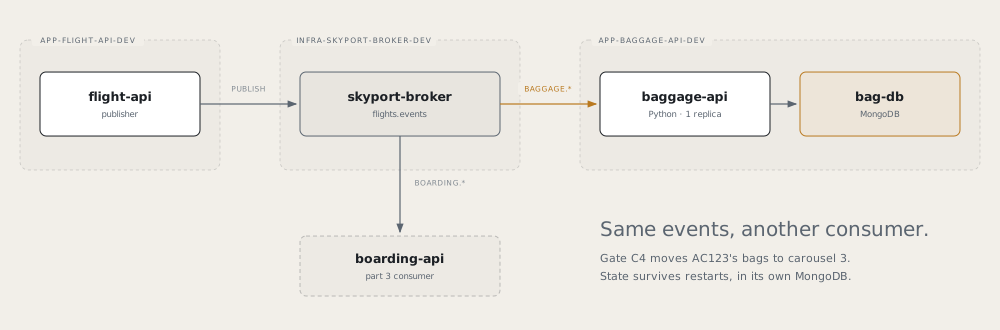
Add a third service on part 3’s events: baggage-api, a Python service that moves a flight’s bags to another
carousel when its gate changes. It is a second consumer on the broker, and it keeps its state in a MongoDB
database of its own.
Before you start
- Finish part 3. The broker’s
allowedNamespacesmust listapp-baggage-api-dev.- The
MongoDBXRD is on both clusters:kubectl --context <dev-cluster> get xrd mongodbs.catalog.hangar.io(and the same for<prod-cluster>).
1. Create the app
Tower → Create → PythonApplication
| Field | Value |
|---|---|
| Name | baggage-api |
| Dev cluster | <dev-cluster> |
| Description | Skyport baggage: re-routes bags when a gate changes |
| Python version | 3.13 |
| Package manager | pip |
| Port | 8080 |
| Visibility | private |
Merge the request PR, then both onboarding PRs.
Check
kubectl --context <dev-cluster> get pythonapplication baggage-api -n app-baggage-api-cicdshowsSYNCED TrueandREADY True.
2. Pull in the code
git clone https://github.com/<github-owner>/baggage-api.git && cd baggage-api
cp -R /tmp/airframe/examples/skyport/baggage-api/. .
./test.sh
The example’s Containerfile replaces the scaffold’s. It uses python:3.13-alpine and removes pip after
installing, because the Debian base and pip’s vendored packages fail the image scan. Keep exactly one
container file in the repo, named Containerfile.
The app exits at start if MONGODB_URI is unset: there is no in-memory fallback.
| Endpoint | Purpose |
|---|---|
GET /api/bags |
Every flight seen: gate, carousel, bags, re-routes |
GET /api/bags/{flight} |
One flight |
GET /api/reroutes |
Recent re-routes, newest first |
GET /api/events/status |
Consumer state (off, connecting, connected) and messages received |
3. Ground: the database, the broker and the pipeline
envName: dev

rollout:
  replicas: 1      # replicas would compete for one queue, each seeing half the events

components:
  - type: rabbitmq
    name: bag-mq
    spec:
      mode: attach
      brokerRef: { name: skyport-broker, namespace: infra-skyport-broker-dev }
      vhost: flights
      queuePrefix: baggage
      consume: [flights.events]
  - type: mongodb
    name: bag-db
    spec: {}       # defaults: one member, 5Gi

env:
  - { name: RABBITMQ_HOST,     fromComponent: { name: bag-mq, output: host } }
  - { name: RABBITMQ_VHOST,    fromComponent: { name: bag-mq, output: vhost } }
  - { name: RABBITMQ_USER,     fromComponent: { name: bag-mq, output: username } }
  - { name: RABBITMQ_PASSWORD, fromComponent: { name: bag-mq, output: password } }
  - { name: MONGODB_URI,       fromComponent: { name: bag-db, output: uri } }
Check it before you push. airframe-validate rejects a component or output that doesn’t exist:
/tmp/airframe/tools/airframe-validate glidepath/envs/dev.yamlapiVersion: platform/v1
kind: PipelineConfig
build:
agent: python-3.13
unitTest:
enabled: true
deploy:
strategy: rollout
environments:
- { name: dev, tier: ground }
governance: # the gates the Containerfile is written to pass
sast: true
imageScan: true
sbom: true
pipelines:
ci:
trigger: { source: git, event: push, branch: main }
steps:
- stage: build
- stage: deploy
env: devCommit both, push, and merge the .tekton/ PR.
Check
kubectl --context <dev-cluster> get mongodbs.catalog.hangar.io,rabbitmqs.catalog.hangar.io -n app-baggage-api-dev
/tmp/airframe/tools/airframe-verify mongodb app-baggage-api-dev/bag-db --context <dev-cluster>
The
COMPONENTcolumn showsMongoDBReadyandRabbitMQAttachReady. A replica set takes a few minutes;MongoDBPendingmeans it is still converging.
4. See it work
kubectl --context <dev-cluster> port-forward -n app-flight-api-dev svc/flight-api 8081:8080 &
kubectl --context <dev-cluster> port-forward -n app-baggage-api-dev svc/baggage-api 8083:8080 &

curl -s localhost:8083/api/events/status     # "mode": "connected"
curl -s localhost:8083/api/bags/AC123        # gate and carousel

curl -s -X PUT -H 'Content-Type: application/json' -d '{"gate":"C4"}' localhost:8081/api/flights/AC123/gate

curl -s localhost:8083/api/bags/AC123        # carousel 3 now (A=1, B=2, C=3)
curl -s localhost:8083/api/reroutes          # the move
A flight appears only after its first event. Restart the pod: the bags and re-routes are still there, in bag-db.
If mode stays connecting, the bind is refused: flight-api hasn’t declared the exchange yet, or the
namespace is missing from the broker’s allowedNamespaces.
5. Flight: staging on the prod cluster
As in part 1, steps 6 to 9:
- Broker first: the broker’s staging values must list
app-baggage-api-staging(part 3, step 6). cicd.yaml: add the staging environment and areleasestage. Merge the.tekton/PR.- ApplicationEnvironment: name
baggage-api-<prod-cluster>-staging, namespaceapp-baggage-api-cicd, appbaggage-api, cluster<prod-cluster>, envstaging. Merge it. - Values: in a PR on
gitops-baggage-api, give<prod-cluster>/staging/values.yamlthe samerollout,componentsandenvas dev, withbrokerRef.namespace: infra-skyport-broker-staging. - Release a signed commit and merge the release PR.
Note MongoDB 8.0 crashes at startup on Linux kernels 6.19 to 7.0.13. Check the prod node’s kernel; in that range, set
spec: { mongoVersion: 7.0.14 }onbag-db.kubectl --context <prod-cluster> get nodes -o jsonpath='{.items[*].status.nodeInfo.kernelVersion}'
Remember
- MongoDB is a component, one replica set per environment. Read it with
fromComponent: { name: bag-db, output: uri }. - Run one replica of a queue consumer.
- Python images: alpine, then remove
pip, or the image scan fails. airframe-validateyour env file before you push.- Use
mongodbs.catalog.hangar.ioinkubectl.