
Docs · Airframe
Airframe quickstart 5: a shared token issuer
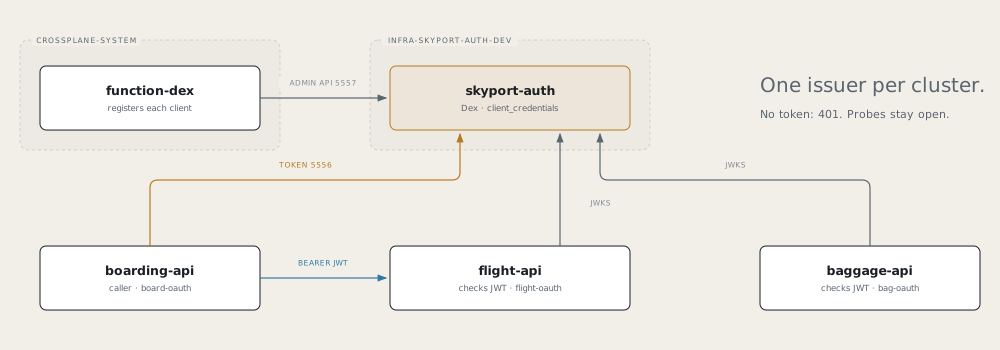
Give Skyport one token issuer, skyport-auth (Dex), and make the APIs require its tokens. flight-api and
baggage-api refuse calls without a valid JWT; boarding-api mints a token and sends it when it calls
flight-api.
Before you start
- Finish parts 1 to 4.
function-dexand theDexXRD are on both clusters:for ctx in <dev-cluster> <prod-cluster>; do kubectl --context $ctx get function function-dex kubectl --context $ctx get xrd dexes.catalog.hangar.io done
How the pieces fit
- One Dex server per environment, in an InfraService, like the broker. Port 5556 serves tokens and keys to the namespaces in
allowedNamespaces; port 5557 (the admin API) is open only to Crossplane. - One OAuth client per app, created by an
attachcomponent. A caller needstokenUrl,clientIdandclientSecret; an API that checks tokens needsissuerandjwksUrl. - Service-to-service only. The one grant is
client_credentials: no browser, no login page. Any valid token from this server is accepted; there are no per-client scopes. - Off until configured. The code is already in the images. An API enforces tokens once
OAUTH_JWKS_URLis set; probes and/api/whoamistay open.
1. Create the InfraService
Tower → Create → InfraService
| Field | Value |
|---|---|
| Name | skyport-auth |
| Namespace | infra-skyport-auth-cicd |
| Dev cluster | <dev-cluster> |
| Description | Skyport shared OIDC provider (Dex) |
| Visibility | private |
Merge the PR. It creates gitops-infra-skyport-auth.
2. Declare the server
In gitops-infra-skyport-auth, create this file and push it to main:
appType: infra
envName: dev
rollout: { enabled: false }       # no workload of its own: Dex is the component

components:
  - type: dex
    name: skyport-auth            # also the Service: skyport-auth.infra-skyport-auth-dev.svc
    spec:
      mode: server
      size: small
      storageSize: 1Gi
      # Namespaces that may reach the token and key endpoints (5556).
      allowedNamespaces: [app-flight-api-dev, app-baggage-api-dev, app-boarding-api-dev]
Check
kubectl --context <dev-cluster> get dexes.catalog.hangar.io -n infra-skyport-auth-dev        # DexServerReady
/tmp/airframe/tools/airframe-verify dex infra-skyport-auth-dev/skyport-auth --context <dev-cluster>
3. Attach a client to each app
Add one dex component in mode: attach to each app’s glidepath/envs/dev.yaml.
flight-api and baggage-api check tokens (use name: bag-oauth for baggage-api):
components:
  # existing components stay
  - type: dex
    name: flight-oauth
    spec:
      mode: attach
      serverRef: { name: skyport-auth, namespace: infra-skyport-auth-dev }

env:
  # existing entries stay
  - { name: OAUTH_ISSUER,   fromComponent: { name: flight-oauth, output: issuer } }
  - { name: OAUTH_JWKS_URL, fromComponent: { name: flight-oauth, output: jwksUrl } }
boarding-api calls flight-api, so it gets the client credentials:
components:
  # existing components stay
  - type: dex
    name: board-oauth
    spec:
      mode: attach
      serverRef: { name: skyport-auth, namespace: infra-skyport-auth-dev }

env:
  # existing entries stay
  - { name: OAUTH_TOKEN_URL,     fromComponent: { name: board-oauth, output: tokenUrl } }
  - { name: OAUTH_CLIENT_ID,     fromComponent: { name: board-oauth, output: clientId } }
  - { name: OAUTH_CLIENT_SECRET, fromComponent: { name: board-oauth, output: clientSecret } }
Note Push
boarding-apifirst. Onceflight-apienforces, aboarding-apiwithout a token gets401and the gate board answers502until it has one.
boarding-api caches its token until 30 seconds before it expires, and drops it on a 401.
Check
kubectl --context <dev-cluster> get dexes.catalog.hangar.io -AshowsDexAttachReadyfor each client.DexAttachFailedmeans the admin API call failed: check that the server is ready.
4. Check it: 401 without a token, 200 with one
docs/walkthroughs/lib/dex.sh mints a token with boarding-api’s client, without printing it:
. /tmp/airframe/docs/walkthroughs/lib/dex.sh
tok="$(dex_token <dev-cluster> app-boarding-api-dev board-oauth)"
expect_enforced <dev-cluster> app-flight-api-dev flight-api 8080 /api/flights/AC123 "$tok"
expect_enforced <dev-cluster> app-baggage-api-dev baggage-api 8080 /api/bags "$tok"
Each prints without a token 401, with a token 200. Then the real caller:
kubectl --context <dev-cluster> port-forward -n app-boarding-api-dev svc/boarding-api 8080:8080 &
curl -s localhost:8080/api/boarding/AC123     # 200, "source": "flight-api"
That answer proves the whole path inside the cluster: boarding-api reached Dex, and flight-api fetched its keys.
From now on, calling flight-api or baggage-api by hand needs -H "Authorization: Bearer $tok".
5. Flight: staging on the prod cluster
The prod cluster gets its own Dex server. Tokens from the dev server are not valid there.
- ApplicationEnvironment: name
skyport-auth-<prod-cluster>-staging, namespaceinfra-skyport-auth-cicd, appskyport-auth, cluster<prod-cluster>, envstaging, app typeinfra. Merge it. - Server values: in the PR on
gitops-infra-skyport-auth, give<prod-cluster>/staging/values.yamlthe samerolloutandcomponentsas step 2, withallowedNamespaces: [app-flight-api-staging, app-baggage-api-staging, app-boarding-api-staging]. Dex comes up ininfra-skyport-auth-staging. - App values: add each app’s attach component and
enventries from step 3 to its staging values, withserverRef: { name: skyport-auth, namespace: infra-skyport-auth-staging }.
Check
tok="$(dex_token <prod-cluster> app-boarding-api-staging board-oauth)"
expect_enforced <prod-cluster> app-flight-api-staging flight-api 8080 /api/flights/AC123 "$tok"
Remember
- Dex is a component:
mode: serverin an InfraService,mode: attachin each app. - APIs need
issuerandjwksUrl; callers needtokenUrl,clientIdandclientSecret. allowedNamespaceson the server opens port 5556 to an app.OAUTH_JWKS_URLset means enforcing.- One server per environment; tokens don’t cross clusters.
- Deleting an attach component leaves its client on the server; recreating it adopts the existing one.