
Docs · Airframe
Airframe quickstart 7: checkin-api through Tower
The same path as part 6, for a small Python service, done in Tower instead of the terminal: the create form, a staging environment, App Configuration and the release. This is the path recorded as checkin-api, in Tower on hangarplatform.dev/run.
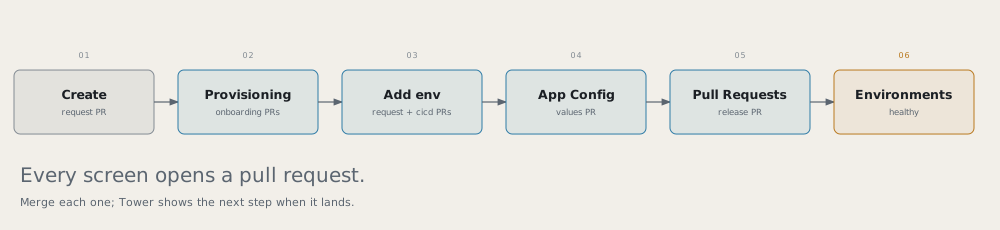
Before you start Read part 1’s rules, and sign in to Tower.
checkin-api says which check-in counters are open for a flight, and which version answered:
| Endpoint | Purpose |
|---|---|
GET /api/checkin/{flight} |
AC123, WS456 or PD789: counters, opening time, bag drop |
GET /api/whoami |
{version, pod} |
GET /healthz |
Liveness and readiness |
1. Create
Tower → Create → PythonApplication
| Field | Value |
|---|---|
| Name | checkin-api |
| Dev cluster | <dev-cluster> |
| Description | Skyport check-in counters |
| Python version | 3.12 |
| Package manager | pip |
| Port | 8080 |
| Visibility | private |
Submit, then merge the request PR. The provisioning strip says Merge the request PR to start provisioning until you do.
2. Follow provisioning
Tower → Services → checkin-api → Provisioning lists each step as it completes: the request applied, the dev cluster checked, CI/CD onboarded, the repos, the catalog entry, the two onboarding PRs, the secret store, the first build, and Running healthy in dev.
Merge both onboarding PRs when they appear. Then push the real code:
git clone https://github.com/<github-owner>/checkin-api.git && cd checkin-api
cp -R /tmp/airframe/examples/skyport/checkin-api/. .
The example’s Containerfile (alpine, pip removed) replaces the scaffold’s, which fails the image scan. In
cicd.yaml, set build.unitTest.enabled: true, or make the same change in Tower’s Glidepath tab (it opens
a PR). Commit, push, and merge the .tekton/ PR.
3. Add the staging environment
Tower → checkin-api → Environments → Add environment: tier Flight, name staging, cluster
<prod-cluster>. Leave configMapGenerator off.
This opens two PRs. Merge the environment request first, so the environment exists when cicd.yaml names it:
- the
ApplicationEnvironmentrequestcheckin-api-<prod-cluster>-staging, on the tenants repo; - the
cicd.yamlchange adding{ name: staging, tier: flight, cluster: <prod-cluster> }.
Then add a release stage for staging in the Glidepath tab’s Pipelines section:
      - stage: release
        env: staging
The environment’s expanded row shows its provisioning: the request, Crossplane applying it, the values file, the first deploy.
4. Configure staging
Tower → checkin-api → App Configuration → staging. Check the environment named at the top before you save.
| Section | Value |
|---|---|
| Deployment | On |
| Scaling | Replicas 4 |
| Service | Port name http, container port 8080 |
| Health checks | Liveness and readiness: HTTP GET /healthz on 8080 |
| Canary steps | setWeight 25, pause 45s, setWeight 50, pause 45s, setWeight 100 |
Save opens a PR on gitops-checkin-api. Read the diff, then merge it.
Note A probe on a path the app doesn’t serve crash-loops the pods, and Tower can still show the rollout as Progressing. If it sits there, look at the pods:
kubectl --context <prod-cluster> get pods -n app-checkin-api-staging.
5. Release
Push a signed change to main. After build and deploy to dev, the release stage opens a PR on
gitops-checkin-api. Tower’s Pull Requests tab lists it with its gates. Wait for them (image-promotion
runs last), then merge it.
6. Live on staging
Tower → checkin-api → Environments: staging shows Flight, the prod cluster, Healthy, and the live image.
Check
kubectl --context <prod-cluster> port-forward -n app-checkin-api-staging svc/checkin-api 18087:8080 &
curl -s localhost:18087/api/checkin/AC123
Remember
- Merge the request PR, then both onboarding PRs, then the
.tekton/PR. - Add environment opens two PRs: merge the environment request first.
- Progressing in Tower can hide a crash loop; check the pods.
- Sign every commit you release.