
Docs · Airframe
Airframe quickstart 6: gate-api from the terminal
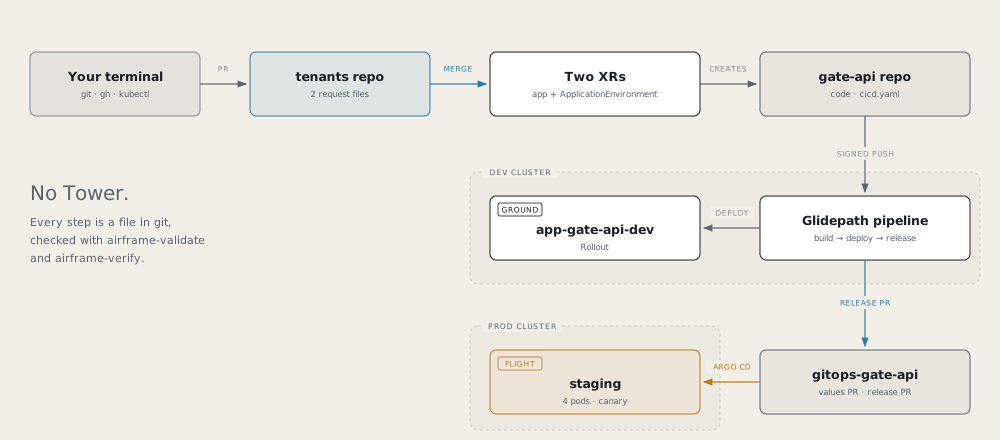
Take the smallest Skyport service from a request file to a canary on the prod cluster without opening Tower.
Every step is a file in git or a kubectl or gh command. This is the path recorded as gate-api, in the
terminal on hangarplatform.dev/run.
Before you start
- Read part 1’s rules; parts 2 to 5 are not needed.
- Clone the dev cluster’s tenants repo (its
tenantsRepoinclusters.yaml).- Configure git to sign with gitsign:
git config gpg.x509.program gitsign,git config gpg.format x509,git config commit.gpgsign true.
gate-api answers “what’s at this gate?” and says which version and pod answered:
| Endpoint | Purpose |
|---|---|
GET /api/gates/{gate} |
A12, A14, B3 or C7; 404 for any other |
GET /api/whoami |
{version, pod} |
GET /healthz |
Liveness and readiness |
1. Request the app
Write the request yourself, in a branch of the tenants repo:
apiVersion: catalog.hangar.io/v1alpha1
kind: NodeJSApplication
metadata:
  name: gate-api
  namespace: app-gate-api-cicd
spec:
  devCluster: <dev-cluster>
  description: 'Skyport gate display: which flight is at which gate'
  nodeVersion: '20'
  packageManager: npm
  port: 8080
  visibility: private
Validate it against the XRD, then open a PR and merge it:
/tmp/airframe/tools/airframe-validate --xr tenants/gate-api/xr-requests/gate-api.yaml2. Watch it compose, then merge the onboarding PRs
/tmp/airframe/tools/airframe-verify nodejsapplication app-gate-api-cicd/gate-api --context <dev-cluster>
gh pr list -R <github-owner>/gate-api
gh pr list -R <github-owner>/gitops-gate-api
airframe-verify checks DevClusterReady, CicdOnboarded and that both repos exist. Merge the onboarding PR on each repo.
3. Add the code and the pipeline
git clone https://github.com/<github-owner>/gate-api.git && cd gate-api
cp -R /tmp/airframe/examples/skyport/gate-api/. .
npm test
The example’s Containerfile replaces the scaffold’s. Then set up the whole pipeline at once:
apiVersion: platform/v1
kind: PipelineConfig

build:
  agent: nodejs-20
  unitTest:
    enabled: true

deploy:
  strategy: rollout
  environments:
    - { name: dev,     tier: ground }
    - { name: staging, tier: flight, cluster: <prod-cluster> }

pipelines:
  ci:
    trigger: { source: git, event: push, branch: main }
    steps:
      - stage: build
      - stage: deploy
        env: dev
      - stage: release
        env: staging
Commit (signed), push, and merge the .tekton/ PR.
4. Request staging
Back in the tenants repo:
apiVersion: catalog.hangar.io/v1alpha1
kind: ApplicationEnvironment
metadata:
  name: gate-api-<prod-cluster>-staging
  namespace: app-gate-api-cicd
spec:
  appName: gate-api
  cluster: <prod-cluster>
  env: staging
  configMapGenerator: false
Validate with airframe-validate --xr, merge, then:
/tmp/airframe/tools/airframe-verify applicationenvironment app-gate-api-cicd/gate-api-<prod-cluster>-staging --context <dev-cluster>5. Ground: see it on dev
The push after the .tekton/ merge builds the image and deploys it to dev.
kubectl --context <dev-cluster> get pipelineruns -n app-gate-api-cicd
kubectl --context <dev-cluster> get rollout gate-api -n app-gate-api-dev
kubectl --context <dev-cluster> port-forward -n app-gate-api-dev svc/gate-api 18086:8080 &
curl -s localhost:18086/api/whoami
6. Flight: staging values
In a PR on gitops-gate-api, add to the values Crossplane wrote (keep appName, appType, cluster, envName):
rollout:
  replicas: 4                  # four pods give readable 25% canary steps
  ports:
    - { name: http, containerPort: 8080 }
  resources:
    requests: { cpu: 50m, memory: 64Mi }
    limits: { memory: 128Mi }
  steps:                       # 25%, wait 45 s, 50%, wait 45 s, 100%
    - setWeight: 25
    - pause: { duration: 45s }
    - setWeight: 50
    - pause: { duration: 45s }
    - setWeight: 100
  livenessProbe:
    httpGet: { path: /healthz, port: 8080 }
  readinessProbe:
    httpGet: { path: /healthz, port: 8080 }
Validate it from the gitops-gate-api checkout with /tmp/airframe/tools/airframe-validate <prod-cluster>/staging/values.yaml, then merge.
7. Flight: release
Push a signed change to main. After build and deploy to dev, the release stage opens a PR on
gitops-gate-api that writes <prod-cluster>/staging/release.yaml and a release record. Wait for the gates (sast, image-scan, sbom,
values, provenance, then image-promotion), then merge it:
gh pr list -R <github-owner>/gitops-gate-api
gh pr checks <number> -R <github-owner>/gitops-gate-api
gh pr merge <number> -R <github-owner>/gitops-gate-api
The prod cluster’s Argo CD syncs it.
8. Watch a canary
Bump "version" in package.json, commit (signed) and push. Merge the new release PR, then watch the steps:
kubectl --context <prod-cluster> argo rollouts get rollout gate-api -n app-gate-api-staging --watchTower’s Deployments tab shows the same canary.
Remember
- Two request files make an app with a flight environment: the app XR and an
ApplicationEnvironment. airframe-validate --xrchecks a request before you push;airframe-verify <kind> <ns>/<name>checks it once applied.- Sign every commit you release.
- A canary splits by pod count: one replica can’t show 25%.