
Docs · Glidepath
cicd.yaml reference
cicd.yaml at an app repo’s root is the only file a developer edits to control
their pipelines. There is no Tekton YAML to write, read, or understand - the platform
owns everything under .tekton/ (pure boilerplate, generated at onboarding, see
install-guide.md) and the shared catalog (catalog/).
This doc covers every field. If you just want a working file fast, see quickstart.md or copy one of examples/ instead.
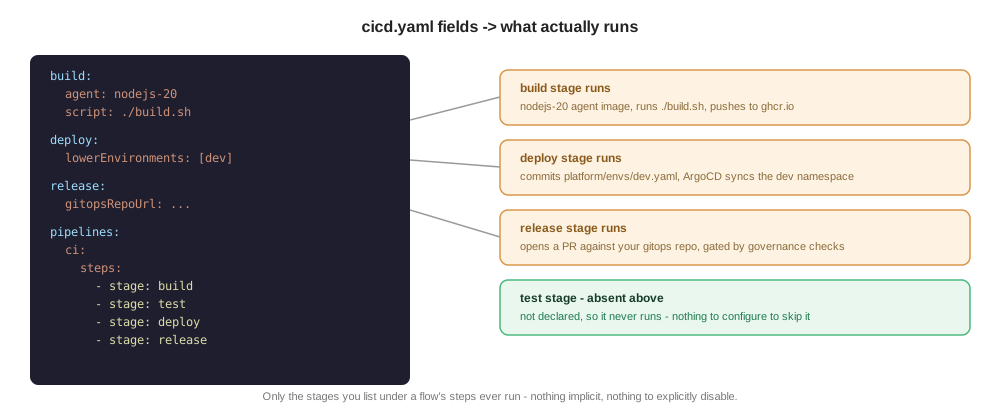
Everything, annotated
Every field this schema accepts, in one place, with an inline comment explaining what
it does, its default, and whether it’s actually load-bearing yet. Nothing here is
required except what’s marked REQUIRED - most apps use a small fraction of this file.
# --- Identity - both required, both fixed values today ---
apiVersion: platform/v1 # REQUIRED. Only one valid value.
kind: PipelineConfig # REQUIRED. Only one valid value.
# --- build: REQUIRED block. Only `agent` inside it is required. ---
build:
agent: nodejs-20 # REQUIRED. One of: nodejs-18, nodejs-20, nodejs-22,
# openjdk-17, openjdk-21, python-3.11, go-1.22.
# A named platform-catalog image, not a raw image
# reference - keeps the step portable and centrally
# patchable. Used for unit tests regardless of which
# build strategy (below) you pick.
script: ./build.sh # Optional. Omit entirely to build your whole app
# inside a multi-stage Containerfile instead (kaniko
# builds `containerfile` directly, build-source is
# skipped). Presence/absence is the switch - there's
# no separate boolean, so a typo can't silently
# disable it. Must be bash.
containerfile: ./Containerfile # Optional, default "./Containerfile" ("Containerfile"
# is this platform's vendor-neutral term for what
# Docker calls a Dockerfile - same file, same format).
# Packaging step if `script` is set; the whole build
# if it's not.
unitTest:
enabled: true # Optional, default true. false skips the unit-test
# command but the stage still runs (span, notify).
command: ./test.sh # Optional, default "./test.sh".
sonar: false # Optional, default false. Reserved field - see
# features.md for current status.
cache:
enabled: false # Optional, default false. Only applies to the
# `script` build path - the Containerfile-only path
# gets kaniko's own layer cache instead, for free.
size: small # Optional, default "small". One of small (1Gi),
# medium (2.5Gi), large (5Gi), xlarge (8Gi). Not
# resizable after onboarding without losing the
# cached content. No `type` field - derived from
# `agent`'s prefix (nodejs-* -> npm cache,
# openjdk-* -> Maven local repo). A no-op for
# python-*/go-1.22 agents (not supported yet).
sourceVolume:
size: small # Optional, default "small". One of small (2Gi),
# medium (5Gi), large (10Gi), xlarge (20Gi). Sizes
# the ephemeral `source` workspace every stage's
# PipelineRun gets (checked-out repo + build output +
# kaniko's build context) - bump this if a build fails
# with "no space left on device", NOT build.cache
# (that's a separate, persistent dependency cache).
# One value applies to every stage's source workspace
# for this app, not build-only.
# --- test: optional block. See "The test: block" below for the full story. ---
test:
enabled: true # Optional, default true. false skips the actual
# test command but the stage still runs.
name: integration # The app-wide default TestWorkflow name every `test`
# step inherits unless it sets its own `testName`. One
# of this or a step's own `testName` MUST resolve to a
# value - checked by validate-cicd-config.
# --- deploy: optional block. See "The deploy: block" below. ---
deploy:
lowerEnvironments: [dev] # Optional, default [dev]. Which env namespaces get
# pipeline-runner RBAC provisioned. A deploy step's
# `env` (below, under pipelines:) MUST appear in this
# list or upperEnvironments, or validate-cicd-config
# rejects the flow before anything runs.
upperEnvironments: [] # Optional, default []. Which upper (release-stage)
# envs this app has - a release step's `env` (below,
# under pipelines:) MUST appear here. Each entry is
# either a plain name (same-cluster, e.g. "staging") or
# {name, cluster} if that env is hosted on a different
# physical cluster - see docs/multi-cluster.md.
strategy: rollout # Optional, default "rollout" (Argo Rollouts
# canary/blue-green) - the only strategy actually
# implemented. "deployment" is still schema-valid
# but has NO EFFECT - nothing renders a plain
# Deployment anymore.
# --- ephemeralEnvironments: optional block. See features.md for the full writeup. ---
ephemeralEnvironments:
branch:
enabled: false # Optional, default false. Spin up a real,
# temporary deploy per matching branch.
patterns: ["preview/*"] # Optional, default ["preview/*"]. Glob(s) a
# branch name must match to get its own env.
pullRequest:
enabled: false # Optional, default false. Same idea, gated on a
# PR label instead of a branch name.
labels: ["preview"] # Optional, default ["preview"]. PR must carry one
# of these labels to get an ephemeral env.
ttl: 5d # Optional, default "5d". Pattern: digits + h or d.
# How long an ephemeral env survives after its last
# successful deploy before automatic teardown.
# --- governance: optional block. Real gates, not stubs - see features.md. ---
governance:
sast: false # Optional, default false. Real Semgrep scan.
imageScan: false # Optional, default false. Real Trivy scan.
policyCheck: false # Optional, default false. Only gates a build-time
# shift-left copy of this check, if one exists - the
# release-gate gitsign commit-signature check itself
# always runs regardless of this flag (release gates
# are enforced, not app-configurable).
sbom: false # Optional, default false. Real cosign SBOM
# attestation.
allowedCommitSigners: [] # Optional, default []. Plain email addresses (not
# regex) - always consulted by the release-gate check;
# leaving this empty fails that check on every release.
# --- notifications: optional block. ---
notifications:
slack:
enabled: false # Optional, default false. Per-stage pass/fail
# notifications to `channel`.
channel: "#team-deploys" # Required if slack.enabled is true. No default.
scanResults: true # Optional, default true. Separate, shift-left
# notifications the moment a real governance scan
# (sast/imageScan) produces a result, independent
# of the general per-stage notification above. Only
# takes effect when slack.enabled is also true.
backstage:
enabled: false # Optional, default false. Same general per-stage
# pass/fail notification as slack.enabled above, sent
# instead (or as well - independent toggles) into
# Backstage's own Notifications plugin, broadcast to
# every Backstage user and visible in Tower's
# Notifications tab. No channel/scanResults fields -
# broadcast-only, general per-stage notification only.
# Requires the cluster's glidepath-catalog chart to be
# configured with backstageBaseUrl and a
# glidepath-backstage-notify token Secret - see
# ../admin/notifications.md. Silently no-ops on a
# cluster where that isn't set up.
# --- secrets: optional. Pulls keys from this app's own backend secret store. ---
# See ../admin/app-secrets.md - open-ended by design, not just for Slack.
secrets:
- name: slack-webhook-url # Becomes a key in this app's app-secrets Kubernetes
# Secret. A consuming Task (notify-slack.yaml today)
# mounts app-secrets and reads this exact filename.
- name: sast-scan-token # Any future purpose works the same way - no schema or
key: sast-creds-token # template change needed, just a new entry here. `key`
# (optional) is the name as it exists in the backend
# store, when different from the name you want here -
# defaults to `name` when omitted, as in the entry above.
# --- pipelines: optional, but the whole point of this file for most apps. ---
# A map of named flows. Each flow has a `trigger` (fires the FIRST step only) and an
# ordered `steps` list (chaining is purely positional - see "How flows work" below).
pipelines:
<flow-name>: # Any name you want - becomes part of generated
# Trigger/PipelineRun object names, so keep it short
# and identifier-safe.
trigger:
source: git # "git" (PaC/webhook-triggered - only valid for a
# flow's FIRST step) or "event" (CDEvents broker -
# not yet supported for a flow's first step, only
# meaningful internally).
event: push # One of: push, pull_request, tag, branch.created
# (git sources); deploy/artifact.published/
# testcaserun.finished/service.deployed/
# change.created (internal CDEvents, not for you to
# set directly). No release.created - GitHub sends
# no such webhook PaC can receive; use `tag`
# instead (publishing a Release also creates the
# tag).
branch: main # Exact branch name, OR a glob like "release/*".
# Used by push/pull_request (via PaC's own
# on-target-branch matcher) AND by branch.created
# (via a CEL regex the platform builds for you).
branchPattern: "" # Accepted by the schema but not currently
# consumed anywhere in the platform - use `branch`
# (it already accepts glob patterns) instead.
tagPattern: "v[0-9]+\\.[0-9]+\\.[0-9]+" # REQUIRED when event is "tag". A
# regex (not a glob) the pushed tag name must
# match. Backslash escapes are handled correctly.
filePathPattern: ["api/**"] # Optional. Only trigger when a changed file
# matches one of these globs. push events only.
labels: ["preview"] # Optional, pull_request events only. Only trigger for
# a PR carrying ALL of these GitHub labels (same
# all-must-match semantics as ArgoCD's own pullRequest
# generator `labels:` field - see
# ephemeralEnvironments.pullRequest above). Omit for no
# label filter (fires on every PR touching this
# branch). If you're building an image for
# ephemeralEnvironments.pullRequest to deploy, match
# this to that same label or you'll build on every PR,
# not just ones that actually get an environment.
#
# You normally don't need to write a pipelines.pr-build
# entry at all: setting ephemeralEnvironments.
# pullRequest.enabled: true is enough on its own - the
# platform synthesizes exactly this flow shape
# automatically (branch reused from your push flow,
# labels reused from ephemeralEnvironments.pullRequest.
# labels). Only declare pipelines.pr-build yourself to
# override that default - see
# ../admin/ephemeral-environments.md.
steps:
- stage: build # REQUIRED per step. One of build/test/deploy/
# release. build, if present, must be the flow's
# first step - nothing chains into it.
env: dev # Required for test/deploy/release steps; not
# valid on build. Which environment this step
# targets/exercises.
testName: integration # Only meaningful on a test step - see the test:
# block above. Not called `name` - see below.
cluster: prod-cluster # Only valid on a release step. Optional - only set
# this if you want an explicit consistency check
# against deploy.upperEnvironments' own mapping for
# this env (they must agree); normally the cluster
# resolves from there and this can be omitted. See
# docs/multi-cluster.md.
name: my-label # Optional free-text label, passed through to the
# generated PipelineRun's params. Cosmetic today.
# A different field from testName above - this one
# exists on every step, testName only matters on a
# test step.Design rules this file follows
- Read fresh, every run, from the triggering commit.
validate-cicd-config(always the first Task in every Pipeline) readscicd.yamlstraight out of the cloned workspace and validates it on the spot. There is deliberately no ConfigMap sync, no cache, no second copy anywhere - acicd.yamlchange takes effect on the very next push, full stop. - Fixed superset DAG, not arbitrary graphs.
pipelines:toggles and orders a known, finite stage set (build,test,deploy,release). It cannot express an arbitrary DAG - that would require compiling a bespoke Pipeline per app, a meaningfully heavier engineering commitment than is justified until there’s real evidence apps need it. governancetoggles are honest about being real, not stubs. Settinggovernance.sast: trueruns a real Semgrep scan - see features.md and ../admin/governance-stubs.md for exactly what each gate verifies.
Two build strategies: build.script, or a multi-stage Containerfile
build.script (e.g. ./build.sh) is optional, not required. Two ways to structure
a build, pick whichever fits:
- Script + thin Containerfile (the common shape - see
examples/02-standard-ci.yaml):
build.scriptdoes the actual build (npm ci && npm run build,mvn package, …) inside the resolvedbuild.agentimage, andbuild.containerfilebecomes a thin packaging step that just copies the already-built artifacts. This runs as its own Tekton Task (build-source), concurrently with unit tests. - Everything in a multi-stage Containerfile (see
examples/08-containerfile-only-build.yaml):
omit
build.scriptentirely and do the whole build insidebuild.containerfile(FROM ... AS builder/RUN npm ci && npm run build/COPY --from=builder). Thebuild-sourceTask is skipped entirely and kaniko builds the Containerfile directly. Build caching in this path comes from kaniko’s own layer cache, notbuild.cache- order your Containerfile’sCOPY package*.json/RUN npm cibefore copying the rest of the source, or the cache invalidates on every source change regardless of whether dependencies changed.
build.agent is required either way - unit tests always run inside it, independent of
which build strategy you pick.
Build dependency caching (build.cache)
Only applies to the build.script path above - the multi-stage-Containerfile path
caches via kaniko’s own layers instead (see above). Opt in with:
build:
  agent: nodejs-20
  script: ./build.sh
  cache:
    enabled: true
    size: small   # small=1Gi, medium=2.5Gi, large=5Gi, xlarge=8Gi - default small
No type field - it’s derived from build.agent’s prefix (nodejs-* -> npm, openjdk-*
-> Maven), not a second, separately-declarable value that could disagree with agent.
Agents without cache support yet (python-*, go-1.22) treat enabled: true as a no-op
(logged, not an error).
What’s actually cached is the build tool’s own download cache (npm’s tarball cache,
Maven’s local repository) - not node_modules/target directly, since npm ci deletes
and rebuilds node_modules from scratch by design. The cache is a real, persistent,
per-app PVC, keyed by a hash of the relevant lockfile (package-lock.json/pom.xml)
so a dependency change invalidates it automatically rather than serving stale packages.
Not resizable live after onboarding - changing size later means recreating the PVC
(losing its content).
Build source volume (build.sourceVolume)
Every stage’s PipelineRun clones the repo into a source Tekton workspace - the checked-
out tree, build.script’s own output (dist/, target/, …), and kaniko’s build
context all live there. For most apps the default is plenty; a large monorepo-style repo
or a build that produces a lot of intermediate output can fill it, which shows up as a
build failing with no space left on device rather than any error from your own build
script. Bump it with:
build:
  agent: nodejs-20
  script: ./build.sh
  sourceVolume:
    size: medium   # small=2Gi, medium=5Gi, large=10Gi, xlarge=20Gi - default small
This is a different volume from build.cache above - sourceVolume is the ephemeral,
per-run working directory (a fresh volumeClaimTemplate-backed PVC every PipelineRun,
torn down when the run completes), while build.cache is the persistent, per-app
dependency-download cache that survives across runs. Sizing sourceVolume up doesn’t
help a slow dependency install; sizing build.cache up doesn’t help a build running out
of disk. One sourceVolume.size applies to every stage’s source workspace for the app
(build/test/deploy/release), not just build’s - simpler than a per-stage knob, and build
is normally the only stage large enough to need it anyway. Since it’s a fresh PVC every
run, there’s nothing to migrate: a size change just takes effect on the next PipelineRun.
The test: block
test:
  enabled: true       # default true
  name: integration   # falls back to nothing - see "How flows work" below, one of
                       # test.name or a step's own `testName` must be set
test.name is the app-wide default TestWorkflow name, inherited by every test step in
every flow that doesn’t set its own testName. enabled: false skips the stage’s actual
test run but the stage still runs (span, CDEvent, Slack notification) - it just reports
success without having tested anything.
Whatever name is in effect resolves to one of two things, checked in this order:
platform/<name>.yaml(Testkube, preferred) - if this file exists, it’s applied as a TestkubeTestWorkflowand run for real. It doesn’t have to be a test in the strict sense - a TestWorkflow is just “a thing that runs and reports pass/fail,” soplatform/<name>.yamlis equally at home clearing a cache or running some other ops action before release as it is running assertions against your code. Testkube CE installs into one sharedtestkubenamespace on this cluster (not one per Application - cross-namespace execution is a Testkube Pro/Enterprise-only feature), so two things about this file are enforced by the platform, not left to convention:metadata.nameis always overwritten to<your-app-name>-<name>before applying, regardless of what you put there - required so TestWorkflow names stay unique across every onboarded Application sharing that one namespace.- To reference your own app-secrets in the workflow’s env, use the literal
secretKeyRef.namevalue__APP_SECRETS_NAME__- it’s substituted for your Application’s real, per-Application secret name in that shared namespace before applying. Don’t hardcode a real secret name; it won’t exist under that name.
Whatever’s in this namespace’s ownenv: - name: API_TOKEN valueFrom: secretKeyRef: { name: __APP_SECRETS_NAME__, key: api-token }app-secrets(thesecrets:block earlier in this file) is what shows up there - same keys, materialized fresh into Testkube’s namespace immediately before each run and blanked again immediately after. A Kyverno policy in thetestkubenamespace enforces thatsecretKeyRef.namehere can only ever resolve to your own Application’s secret, not another tenant’s - see../admin/adr/0008-kyverno-testkube-secret-policy.md. - See the TestWorkflow CRD docs (docs.testkube.io) for the rest of
spec:- image, command, assertions, etc. are all standard Testkube, nothing platform-specific beyond the two rules above.
./integration-test.sh(fallback) - if there’s noplatform/<name>.yaml, this runs instead, in your ownbuild.agentimage. Whatever name is in effect, plus the step’senvand the image reference under test, reach it asTEST_NAME/TEST_ENV/IMAGE_REFenvironment variables. This is the original, pre-Testkube mechanism - kept working for Applications that haven’t added aplatform/<name>.yamlyet, not the recommended path for a new Application.
Neither present: the stage still runs (span, CDEvent, notification) but reports success
without having tested anything, same as enabled: false.
The deploy: block
deploy:
  lowerEnvironments: [dev]      # default
  upperEnvironments: []         # default
  strategy: rollout             # default; the only strategy actually implemented -
                                 # every deploy provisions an Argo Rollout.
                                 # "deployment" is still schema-valid but has NO
                                 # effect today.
promotionOrder: [] # default; optional, see belowlowerEnvironments/upperEnvironments aren’t the thing that decides where a flow
deploys - that’s each deploy/release step’s own env: under pipelines: (below). A
deploy step’s env must appear in lowerEnvironments or upperEnvironments, and a
release step’s env must appear in upperEnvironments specifically - either is a
validate-cicd-config rejection before anything runs, rather than failing later (a bare
Forbidden deep inside the deploy Task, in the deploy case).
For deploy, this list only provisions RBAC (one Role/RoleBinding granting
pipeline-runner access per listed env) - deploy always stays on this cluster. For
release, an upperEnvironments entry can additionally be {name, cluster} instead of
a plain string, naming a different physical cluster that env’s ArgoCD Application
actually lives on (resolved against the control-plane chart’s own cluster registry) -
see multi-cluster.md for the full mechanism, including how the
release PR delivery and ArgoCD feedback path differ for a cluster-mapped env.
promotionOrder - declaring the full release sequence explicitly
No pipelines: flow has to cover every env this app declares. A perfectly normal setup
is a single automated flow that only takes a build as far as dev, leaving every later
env - another lower env like test/rel, and every upper env - to a manual promotion
(e.g. Backstage’s Glidepath “Promote” button) rather than more pipeline automation.
That’s a problem for anything trying to infer “what order do this app’s envs promote
in?” from pipelines: alone: a flow’s own step list only reflects what’s automated, not
the app’s full intended sequence. promotionOrder is the fix - declare the whole
sequence once, explicitly:
deploy:
  lowerEnvironments: [dev, test, rel]
  upperEnvironments: [staging, pre-prod, prod]
  promotionOrder: [dev, test, rel, staging, pre-prod, prod]
This is metadata only - platform-cicd’s own Tasks/Triggers don’t read it, and it isn’t
required to match any single pipeline’s step coverage. It exists for external consumers
(today: Glidepath) that need to know the real full promotion path, including the parts
that only ever happen through a manual promotion rather than pipeline automation. Every
entry should be a name already declared in lowerEnvironments/upperEnvironments above;
leave it empty (the default) for an app where every env really is covered by pipeline
automation - a consumer with no promotionOrder to go on falls back to inferring order
from pipelines: the same way it always has.
Multi-stage pipeline flows
The pipelines: field enables declarative control of multi-stage, self-chaining
pipelines. Rather than configuring individual legacy triggers, teams declare named flows
with a root trigger source and a sequence of stages. Each flow runs the corresponding
catalog Pipeline (build, test, deploy, release) - no custom Pipelines or DAG
configuration needed.
Editing pipelines: has two independent effects, not one - easy to forget:
changing cicd.yaml’s pipelines: section and pushing it does NOT, by itself, change
which event-chained Triggers exist in the cluster. That only happens via helm upgrade
of the app chart picking up the new cicd.yaml as its values file - see
../admin/onboarding-mechanics.md. The git push side (delivering the updated
git-rooted .tekton/*.yaml PipelineRun definitions) is fully automatic; the
cluster-side Trigger/TriggerBinding/TriggerTemplate objects are not - re-run
helm upgrade yourself after any pipelines: edit that adds, removes, or reorders
event-chained steps, or the new stages simply won’t fire (the git-rooted root stage
still will, since that part IS automatic, which is what makes this easy to miss).
How flows work
Two entirely different mechanisms fire a flow’s steps, depending on position:
flowchart TD
    push["git push / PR / tag / new branch"]

    subgraph mechanism1["Mechanism 1: a flow's FIRST step only"]
        pac["Pipelines-as-Code\nmatches .tekton/flow-<name>.yaml\nagainst the incoming webhook"]
        pr1["Creates the PipelineRun\ndirectly - no broker involved"]
        pac --> pr1
    end

    subgraph mechanism2["Mechanism 2: every step AFTER the first"]
        cdevent["Previous stage's finally block\nemits a CDEvent\n(artifact.published, testcaserun.finished, ...)"]
        broker["In-cluster CDEvents broker\n(Tekton Trigger, CEL-filtered\nby app-namespace + event type)"]
        pr2["Creates the PipelineRun"]
        cdevent --> broker --> pr2
    end

    push --> pac
    pr1 -. "on completion, emits its OWN\nCDEvent, feeding mechanism 2\nfor the NEXT step" .-> cdevent

    style mechanism1 fill:#e8f4fd,stroke:#4a90d9
    style mechanism2 fill:#fef3e2,stroke:#d9954a
deliver-onboarding-files.yaml generates one .tekton/flow-<name>.yaml file per flow
for mechanism 1, driven by your cicd.yaml’s pipelines: section - see
../admin/onboarding-mechanics.md#keeping-onboarding-boilerplate-in-sync. Mechanism 2
is what helm upgrade provisions, per the “two independent effects” warning above.
Trigger sources: The root trigger can be git (pushed webhook from
Pipelines-as-Code, for build/release/deploy/test stages) or event (CDEvent broker, not
currently a supported way to configure a flow’s first step - only used internally).
Subsequent stages are always event-chained: each stage’s completion emits a CDEvent that
the next stage listens for.
Event chaining rules - keyed by whichever stage the step actually follows, not by
the step’s own identity, so any of these pairings works in any combination (confirmed
live, including the less obvious release → test case):
flowchart LR
    build -- "artifact.published" --> test
    test -- "testcaserun.finished\n(outcome: Succeeded)" --> deploy
    deploy -- "service.deployed" --> release
    release -- "change.created" --> next["any stage again -\ne.g. release chained\nINTO a later test step"]
The event a step listens for is determined entirely by whichever stage the previous
step in your steps: list actually is - not by the new step’s own identity. That’s
why release → test (an unusual-looking order) works exactly the same way as
build → test: flow-triggers.yaml looks up the event type from the previous step’s
stage name, not from a fixed build→test→deploy→release sequence.
build→ next: triggered byartifact.published(image built and pushed)test→ next: triggered bytestcaserun.finishedwithoutcome: Succeeded(testis the one stage whose domain event fires unconditionally, pass or fail - every other stage’s event is already gated at the source, so only this transition needs the outcome check)deploy→ next: triggered byservice.deployedrelease→ next: triggered bychange.created
Tracing across stages: Each flow gets a chain-id and OpenTelemetry traceparent at
the root stage, threaded through all subsequent stages via CDEvent payloads. The
flow-root span covers the entire automated pipeline execution (all stages’ durations),
not including human review/merge time.
Chaining order is positional, full stop. There is no after: field - an earlier
draft had one, but nothing ever read it (chaining was always determined by a step’s
index in the steps: list, looking at whichever stage the previous entry declares), so
it was pure decoration that could silently disagree with what actually ran. It was
removed rather than left in place. Write your steps in the order they execute.
Every test step needs env and a resolvable test name. env says which
environment’s build this run is exercising (there’s no default - a test result is
meaningless without knowing what it ran against). The test name can come from either
the step’s own testName, or the top-level test.name shared by every test step in the
app - one of the two has to resolve, checked by validate-cicd-config before anything
runs. The step-level override only matters once a flow has more than one test step (the
two-step case: hitting the same build with two different TestWorkflows) - otherwise just
set test.name once and every test step inherits it. Both env and the resolved test
name, along with the image reference under test, reach your own ./integration-test.sh
as TEST_ENV, TEST_NAME, and IMAGE_REF environment variables.
A deploy step’s env must be provisioned. It has to appear in
deploy.lowerEnvironments or deploy.upperEnvironments (see above) - that’s the list
deploy-rbac.yaml actually grants pipeline-runner access into. Declaring
env: staging on a deploy step without also listing staging under
deploy.upperEnvironments is now rejected at validate-cicd-config time, instead of
failing later with a bare Forbidden RBAC error deep inside the deploy Task.
Event-chained flows (downstream chaining)
Stages after the root are always event-chained - they’re triggered by CDEvents emitted
by the previous stage, not by new git events. This is automatic: when you declare a
multi-stage steps: list, the platform wires up the event triggers for you (after a
helm upgrade - see above).
The only exception is if you omit a stage from the flow - say, you configure
build → deploy with no test stage. In that case, deploy still waits for
artifact.published from build; the platform doesn’t create a path for build to
directly trigger deploy. If you need to skip stages conditionally, use the app’s own
cicd.yaml to enable/disable stages, not the pipelines flow structure.
Migration from legacy list form
Earlier cicd.yaml files used a list form for the pipelines: field:
# Legacy (still supported) list form
pipelines:
  - task: build
    trigger: push
    branch: main
  - task: test
  - task: deploy
    triggerEnv: dev
This is automatically normalized to the new object form internally. The new form is preferred for clarity, especially when naming flows or using event-based triggers.
Local validation before pushing
Run yajsv -s schemas/cicd.schema.json <(yq -o=json . cicd.yaml) locally (same tool
validate-cicd-config uses) to catch schema errors before a push burns a pipeline run
finding them for you.
Real bugs found in this mechanism, fixed - worth knowing about if something looks wrong
enabled: false silently ineffective (fixed). build.unitTest.enabled and
test.enabled both used to be read via jq -r '.path.enabled // true' - jq’s //
operator treats false the same as null/missing, so an explicit enabled: false was
silently overridden back to "true". No Application had ever actually been able to
disable unit tests or the test stage via cicd.yaml until this was found
and fixed. Verified live: unitTest.enabled: false now genuinely skips the test
command.
Tests never actually ran, for anyone, ever (fixed). A separate, deeper
bug in the same area: the test stage’s Task (run-integration-tests.yaml at the time,
since renamed to run-testworkflow.yaml) had its internal result-passing write a
value with a trailing newline that a cross-step variable substitution doesn’t strip
("true\n" instead of "true"), so its own enabled-check always evaluated false
regardless of the real config. Every test run silently reported “disabled…
skipping.” Fixed and confirmed live - a real test command now genuinely runs.
branch.created’s branch pattern used to be ignored entirely (fixed). The CEL
filter generated for a branch.created trigger never consulted trigger.branch at all
- any newly created branch fired the flow, regardless of the pattern you set. Confirmed
live both before (fired on a non-matching branch) and after the fix (correctly filtered:
a matching
preview/xbranch fired it, a non-matching one didn’t).
None of the above require anything from you - they’re platform-side fixes, documented
here so a cicd.yaml that looked like it “should” have worked before now actually does.