
Docs · Tower
Walkthrough: a Flight session
On Flight (staging, production) a session needs two people: you ask, someone else approves, then you start it. Nothing touches the cluster until you press Start. This page follows both sides.
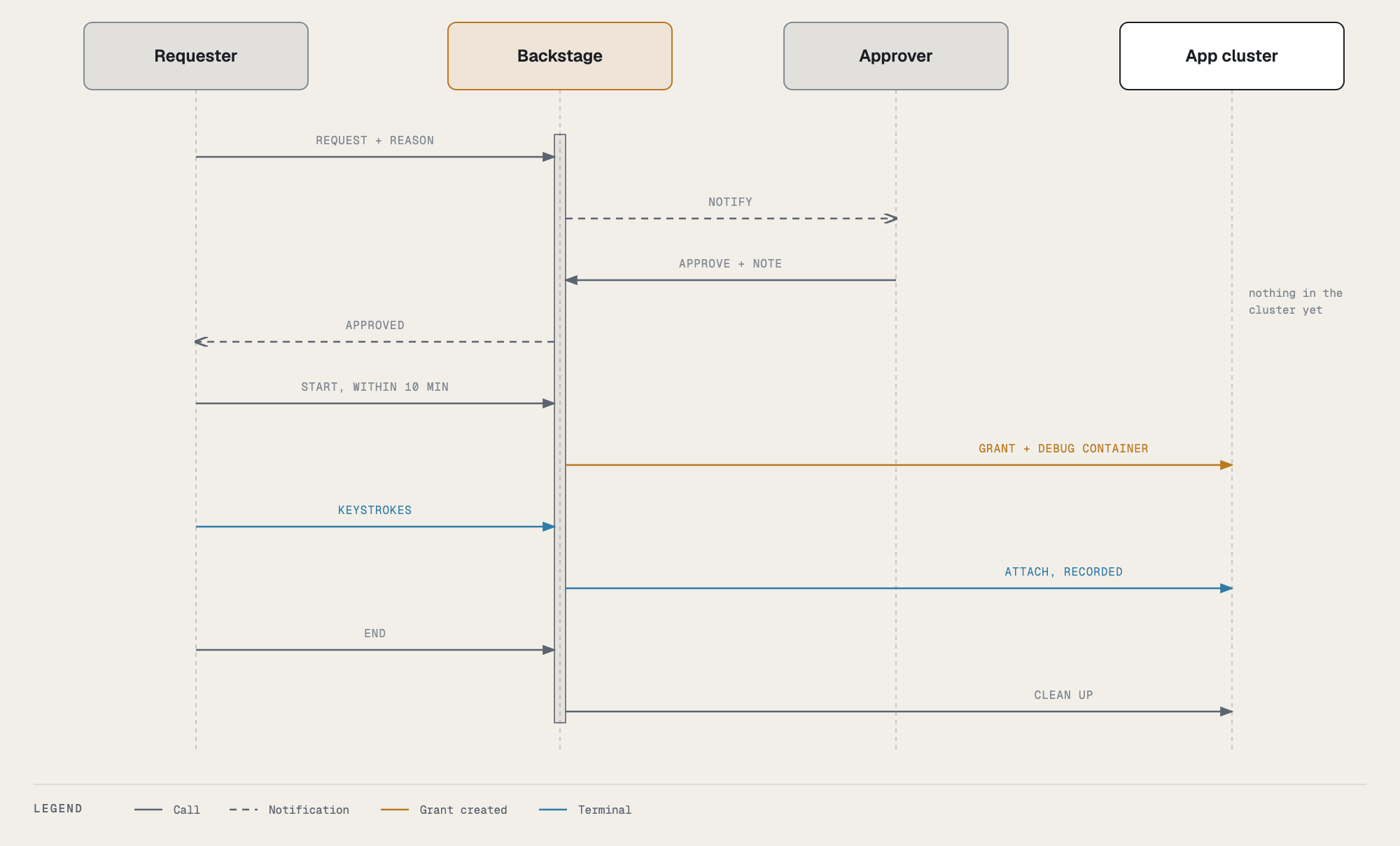
Who can approve: an owner of the app (a member of its owning team) other than you, or an admin. Tower refuses your own approval, and so does the cluster: on Flight the grant must name an approver who is not the requester.
The requester: ask
- Find the pod and press Debug (Topology → the environment → Pods → the pod), exactly as on Ground.
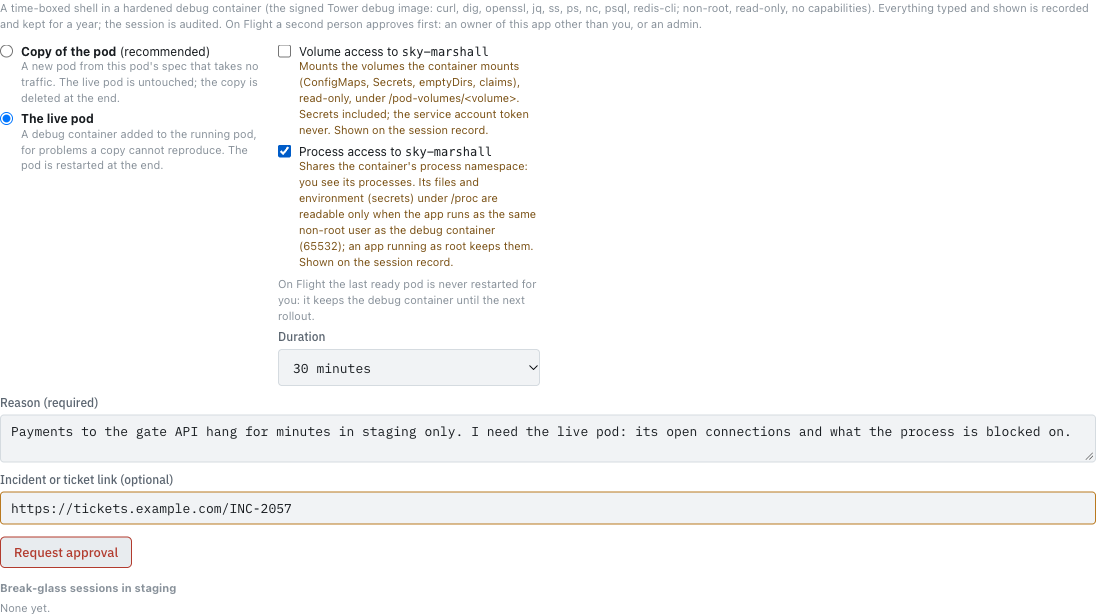
- Fill in the form. It is the same form, with two differences:
- the panel tells you a second person approves first;
- there is no “restart even if it is the only ready one”: on Flight the last ready pod is never restarted for you.
- Write a reason an approver can judge without asking you, and add the incident link if there is one. The approver sees exactly what you ask for: mode, process access, volume access, duration, reason, link.
- Press Request approval.
The panel now shows that you are waiting, for whom, and when the request expires (30 minutes). Withdraw cancels it.

The app’s owners (except you) and the admins get a high-severity notification, Break-glass request on
The approver: decide
- Open the notification’s link (it opens the request), or go to the environment in Topology: the Break-glass card under Pods (and any pod’s Debug panel) shows it. The Break-glass strip on the Tower home page lists every request you can decide, across apps.
- Under Requests awaiting a second person you see each request: who, the mode and options, the pod, the duration, the reason, the ticket link, the time left, what the pod runs (image and digest, with the release to look up in the Releases tab), whether a copy holds or runs the app, and whether the session is sensitive (it can read Secrets; its recording will be restricted).
- Judge it the way you would judge a production change:
- Is the reason specific? Could a log line, a metric or the Topology tab answer it instead?
- Is the mode the least intrusive that works? A copy before the live pod; process or volume access only if the reason needs it; a copy that runs the app only when the reason needs the app running.
- Is the duration sensible?
- Optionally write a note (it goes on the record and to the requester). For a live session you may tick Keep the pod after the session (it is the evidence) with a required reason: the pod is then not restarted at the end and keeps its debug container until the next rollout; the reason goes on the record and to the requester. Then Approve or Deny.

Only one decision counts: if two people decide at once, the second is told it was already decided. A request that has expired cannot be approved.
The requester: start
The requester gets a notification (approved or denied, with the note; its link opens the session). After an approval the pod’s Debug panel, the Break-glass card and the home page’s strip show who approved it and the 10 minutes you have to start:

Press Start recorded session. Only now does Backstage grant itself the debug role in the namespace (the grant names you and the approver), add the debug container, and start the recording. The session’s 15, 30 or 60 minutes start now, not at approval.
From here it is the same as Ground: the red banner, the countdown, Extend +15 min (once, no second approval), and End session. See Inside the session.
Ending on Flight
- Who can end it: you (End session), the approver, or an admin: on the environment’s Break-glass card under Pods, End on your session, with a confirm naming you (recorded as terminated by …).
- Live mode: the pod is restarted through Argo CD when you end, unless it is the last ready pod of its Deployment or Rollout. Then it keeps the debug container until the next rollout, and you are notified to restart it from Tower when that is safe.
- Copy mode: the copy is deleted; the live pods were never touched.
When no one can approve in time
If production is down and no other owner or admin can be reached, an admin can break the glass: start a Flight session at once with no second person. Everyone is told immediately, and the session must be reviewed afterwards.
Timings at a glance
| Step | Limit | What happens at the limit |
|---|---|---|
| Waiting for approval | 30 minutes | The request ends: request expired before anyone approved it. You are notified. |
| Approved, not started | 10 minutes | The approval lapses: approved but not started within 10 minutes. Request again. |
| The session | 15, 30 or 60 minutes, +15 once | The session ends: expired. |
| No input or output | 10 minutes | The session ends: idle for 10 minutes. |
| Terminal closed | 2 minutes | The session ends: terminal closed and not reopened within 2 minutes. |