
Docs · Tower
Recordings
Every break-glass session is recorded: every keystroke sent, everything printed, and every terminal resize, with timestamps. A session cannot start if recordings are not configured.
Who can see a recording
The app’s owners and the admins. Every play and every download is audited, with who and which session.
A sensitive session (volume or process access: it could read Secrets) narrows that to admins, the approver, the
reviewer (while a glass-broken review is due, anyone who could review it) and the requester. Other owners see
the session record, not the recording, with a message saying why; a play of a sensitive recording is audited high.
The recording is not redacted: the backend never reads the Secrets (it has no get secrets), so it cannot know what to
mask, and pattern-masking would give false comfort.
Playing a recording
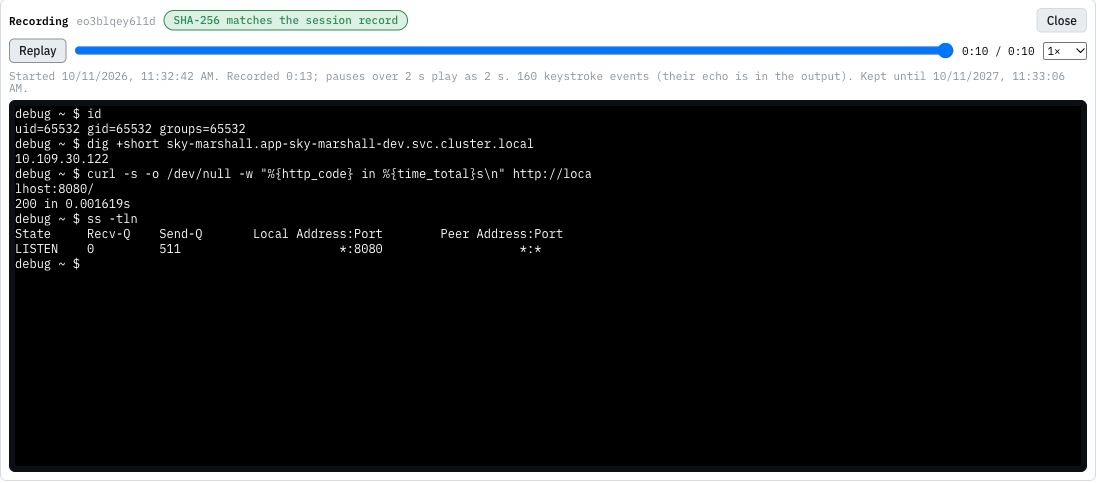
In Topology, the environment’s Break-glass card under Pods (or any pod’s Debug panel) lists the sessions; find yours and press play. The recording opens under the list:
| Control | What it does |
|---|---|
| Play / Pause / Replay | start, pause, or start again from the beginning |
| seek bar | jump to any point; the screen is redrawn exactly as it was then |
| speed | 0.5×, 1×, 2×, 4× or 8× |
| Close | close the player |
The replay runs in the same terminal as a live session, so it looks exactly as the session did, colours and all.
- Pauses are shortened. A gap of more than 2 seconds plays as 2 seconds, so someone reading a page of output does not make you wait. The line under the controls shows the real length (Recorded 4:12) next to the playback length.
- Keystrokes are counted, not replayed. The shell echoes what was typed, so it is already in the output. The line under the controls says how many keystroke events the recording holds.
- The start time and how long the recording is kept are shown under the controls.
Is this the real recording?
When a session ends, Backstage stores the recording’s SHA-256 on the session record. The player downloads the recording, hashes it in your browser, and compares:
| The player shows | Meaning |
|---|---|
| SHA-256 matches the session record | the recording is byte-for-byte the one stored when the session ended |
| SHA-256 does not match the session record | the file differs from what the session stored: treat it as tampered with, and tell an admin |
| integrity not checked | your browser could not hash it (Tower is not on https or localhost), or the session has no stored hash |
Is the store itself trustworthy?
Two things make a recording hard to rewrite after the fact, on top of the SHA-256 check:
- The bucket is object-locked. Every recording (and every checkpoint while the session runs) is a new version in a versioned bucket with a 365-day retention in governance mode: a version cannot be deleted or replaced for a year, not even by the store’s root user without a special bypass right nobody holds day to day. The session record names the exact version the SHA-256 is about.
- The hash is anchored in the platform’s transparency log. When the session ends, Backstage signs the recording’s
SHA-256 with its anchor key and submits it to Rekor; the session record keeps the log index, and the player shows
anchored in Rekor #N. Anyone can check it without Backstage:
rekor-cli get --log-index Nreturns the hash to compare with the file. If Rekor was unreachable when the session ended, the record says not anchored and the backend keeps trying for a day.
Neither depends on the other: the lock stops a replacement, the log proves what the recording was even if both the bucket and the database were later altered by someone with bypass rights.
Downloading
download saves the recording as breakglass-<app>-<env>-<id>.cast. A .cast file is a plain-text
asciicast v2 file:
- the first line is a JSON header: terminal size, start time, and a title naming the mode, the app, the environment, the pod, the requester and the approver (or glass broken);
- every other line is one event:
[seconds, "o" | "i" | "r", data](output, input, resize).
To play it outside Tower, use asciinema (asciinema play breakglass-….cast). To check it
against the record, compare shasum -a 256 breakglass-….cast with the SHA-256 shown when you hover download, and
against the transparency log with rekor-cli get --log-index <N> (the number next to anchored).
How long recordings are kept
365 days from the end of the session. Then the storage deletes the recording; the session record stays, with its
hash, its times and its end reason, but play and download answer the recording was deleted on
When a recording is incomplete
| The record says | Why |
|---|---|
| nothing was recorded: no terminal was opened | the session was started but nobody attached a terminal |
| recording is the last checkpoint before the backend restarted | Backstage restarted mid-session; up to a minute at the end is missing |
| no recording: the backend restarted before the first checkpoint | Backstage restarted in the session’s first minute |
| recording upload failed: … | the storage was unreachable at the end; tell an admin |