
Docs · Tower
Inside the session
Your shell
The terminal runs sh in the debug container, as user and group 65532, in the Tower debug image
(ghcr.io/<owner>/tower-debug, Alpine-based, signed, pinned by digest). The prompt is debug <dir> $.
| Need | Tools |
|---|---|
| HTTP, TLS | curl, openssl |
| DNS | dig, host, nslookup |
| Sockets, routes, processes | ss, ip, lsof, ps, top, nc |
| Data | jq, less |
| Databases | psql (PostgreSQL 17 client), redis-cli |
| Everything else | busybox: ls, cat, grep, sed, awk, find, vi, wget, tar, … |
Not included, on purpose: ping, traceroute, tcpdump, strace, gdb. They need Linux capabilities
(NET_RAW, NET_ADMIN, SYS_PTRACE) that every debug container has dropped. Use nc -zv host port or
curl -v to test reachability instead of ping.
What you can and cannot do
| You can | You cannot |
|---|---|
| read anything the debug container can see | write anywhere: the root filesystem is read-only, and /tmp and $HOME are part of it |
| connect out from the pod’s network, as the pod would | gain privileges: no root, no sudo, no capabilities, no privilege escalation |
read the app’s volumes under /pod-volumes/ (with volume access) |
write to the app’s volumes: every mount is read-only |
| see the app’s processes (live pod, with process access) | read another user’s /proc/<pid>/ files or environment |
| run the clients above against the app’s dependencies | call the Kubernetes API as the app: the debug container has no ServiceAccount token |
| resize the terminal | install packages (read-only filesystem, and no root) |
Shell history and client history files (psql, redis-cli, less) go to /dev/null. The recording is the history.
Useful starting points
ps -o pid,user,args              # processes (live pod, process access): who runs as which user
ss -tnp                          # TCP connections and their state
dig +short <service>.<namespace>.svc.cluster.local
nc -zv <host> <port>             # can the pod reach it?
curl -sv https://<host>/ -o /dev/null   # TLS handshake and certificate
openssl s_client -connect <host>:443 -servername <host> </dev/null | openssl x509 -noout -dates
ls /pod-volumes/                 # volumes (volume access)
psql "host=<db> user=<user> dbname=<db>"   # with the credentials the app mounts
redis-cli -h <host> ping
The banner and the clock
- The red ● Recorded break-glass session banner is always on screen, with the mode, the options, and the time left.
- Extend +15 min adds 15 minutes, once. The countdown then says (extended).
- End session ends it now.
- In live mode a line under the banner reminds you that the pod will be restarted when you end.
- With volume access the mounted volumes are listed under the banner.
Disconnects and other tabs
- Closing the terminal (or losing the network) does not end the session at once. You have 2 minutes to press Reconnect or Reopen terminal. After that it ends and cleans up.
- Opening the same session in a second tab moves the terminal there; the first tab is told opened in another tab.
- Only the requester can attach. An approver or an admin can end a session, but not watch it live; the recording is how anyone else sees it.
Everything is recorded
Every keystroke you send, everything the shell prints, and every terminal resize is written to an asciicast v2 recording with timestamps. It is saved at least once a minute while you work and again when the session ends, with its SHA-256 on the session record. A session whose recording passes 64 MB ends (recording size limit reached). See Recordings.
Do not paste secrets into the terminal. What you type is in the recording for a year.
How a session ends
| End reason on the record | Cause |
|---|---|
| ended by user | you pressed End session |
| shell exited | you typed exit, or the shell died |
| expired | the session’s time ran out |
| idle for 10 minutes | no input or output for 10 minutes |
| terminal closed and not reopened within 2 minutes | you closed the tab or lost the network |
| pod is gone | the pod you were in was deleted (a rollout, a scale-down) |
| terminated by |
an admin or the approver ended it |
| recording size limit reached | the recording passed 64 MB |
| backend restarted during the session | Backstage restarted; the recording is the last checkpoint |
| failed to start: … | the session never opened; the message says why (see Troubleshooting) |
Whatever the reason, the cleanup is the same:
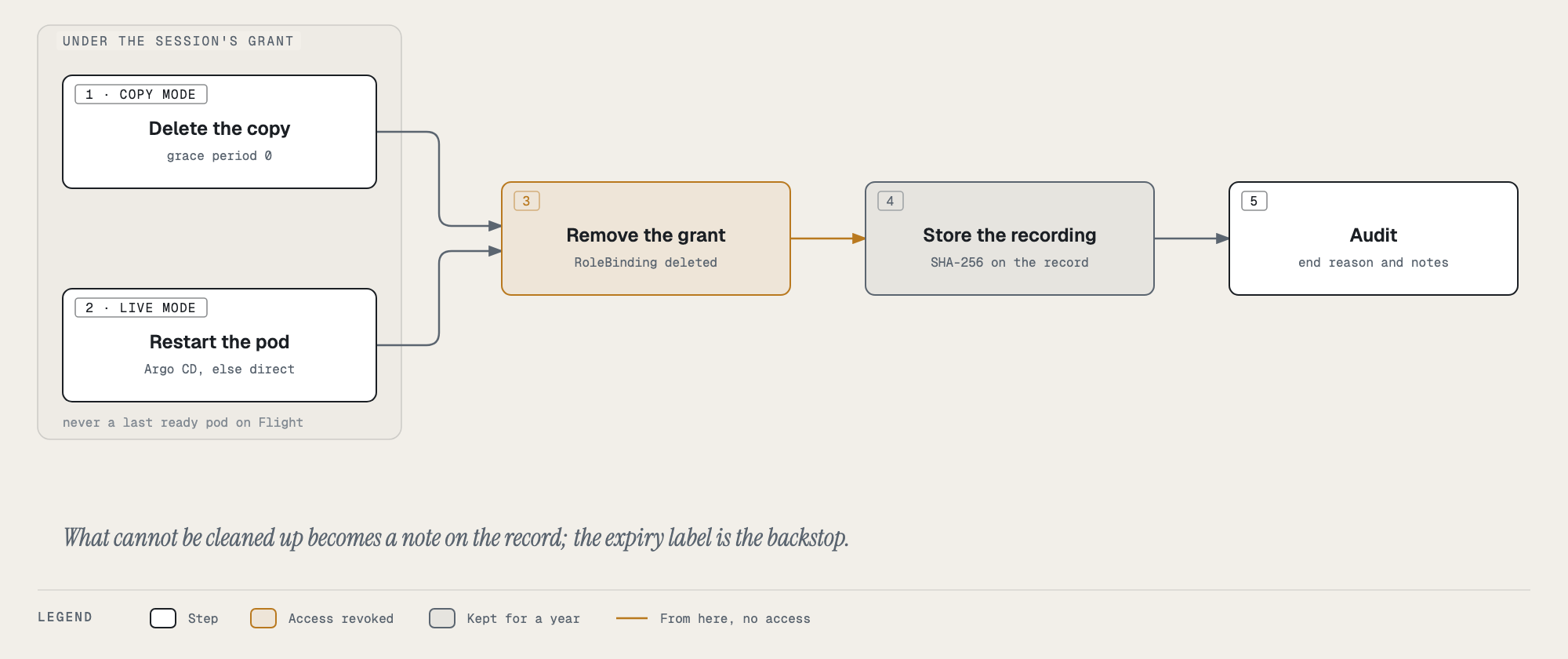
- Copy pod deleted (copy mode), while the grant still allows it.
- Live pod restarted (live mode): through Argo CD, as Tower’s Restart pod does; or deleted directly when Argo CD does not manage it (an attached component such as Redis). Not a last ready pod on Flight, nor on Ground unless you ticked the box; you are notified instead.
- Grant removed: the temporary RoleBinding that gave Backstage the debug role in the namespace.
- Recording stored with its SHA-256.
- Audited, with the end reason, what was cleaned up, and the recording’s hash.
Anything that could not be cleaned up is listed as notes on the record. The grant and the copy pod also carry an expiry label (the session’s length plus 15 minutes): on both clusters Kyverno’s cleanup controller deletes them at that time even if Backstage never does, and a Backstage that restarts ends and cleans up every session the old process left behind within 15 seconds.