
Docs · Tower
Release records
The Releases tab leads with three cards: the next release (the draft), the release live in production (with its bake progress) and the last outcome. Each opens its record in Releases → Releases, the first sub-tab: an app’s release history, one record per release, with what changed, what was built and what happened, the notes written before it shipped and the notes added after. Above the records sits the release that is still being put together, and a row of chips picks the draft or one of the five newest records.
Builds and releases. Every merge to main produces a build: an image such as 1.1.4-9d3dcde, with a two-word
slug for its pipeline flow. A build that ships to a Flight environment becomes a release and gets a name (HAZEL).
The Matrix has a row per build and shows the name on the ones that became releases; Promote says which release an
unnamed build becomes once it is healthy in Flight.
A release is followed from the moment the previous one ships until its outcome is known:
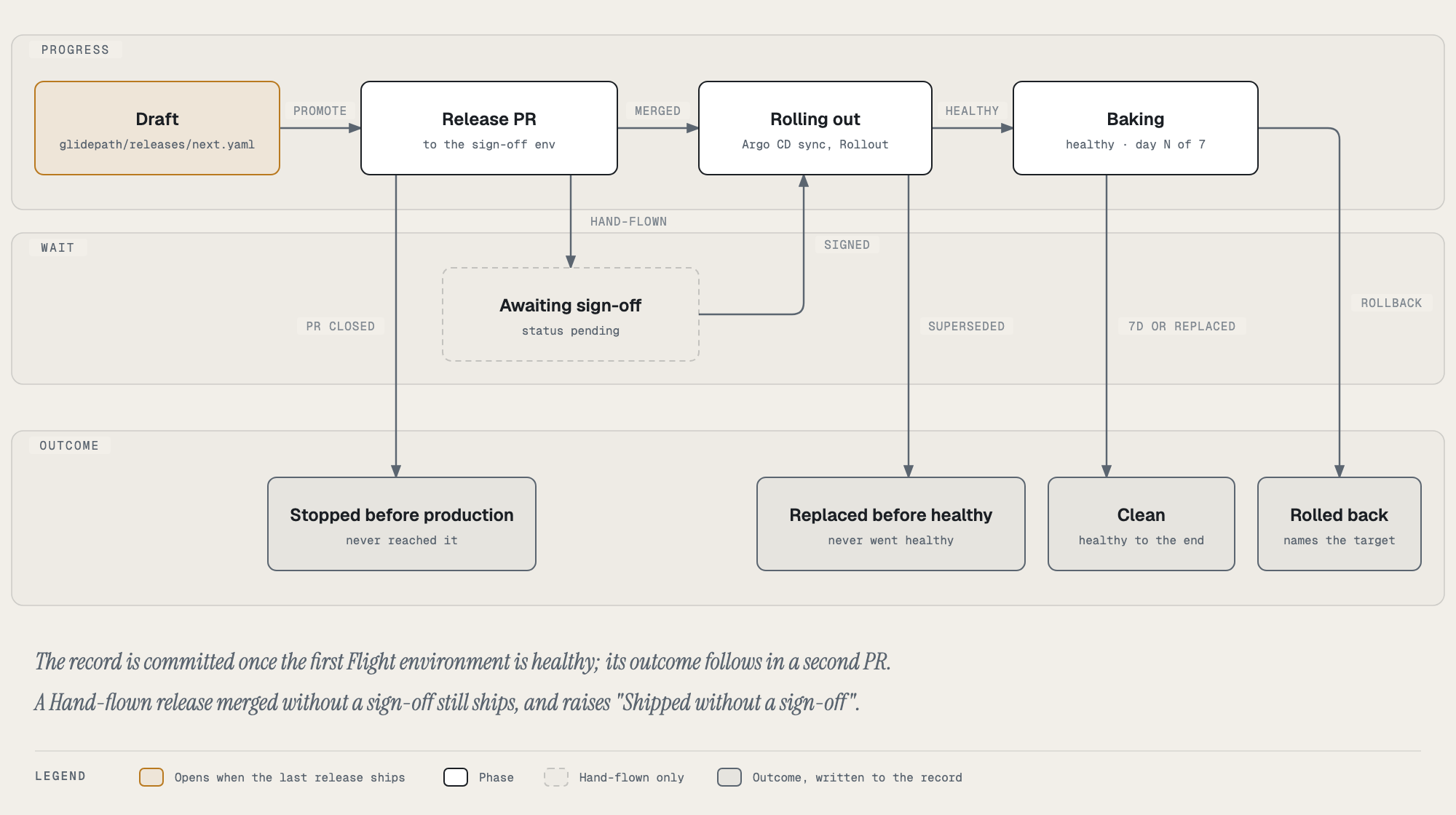
| Stage | Where you see it |
|---|---|
| Draft | The Next release card at the top of the tab and above the records, and the Ops Wall’s Release calendar |
| Release PR, rolling out | The record list’s Flight ladder (● ✓ ○), and the announcements in Activity |
| Record committed | A record row with its tree name; it opens into the full record |
| Baking, outcome | The Live in production card’s bake bar, the Last outcome card, the outcome chip beside the readiness score, and the record’s Outcome panel |
Next release (the draft)
The draft opens the moment the previous release reaches Flight, so an app always has one, before any PR is opened. It is computed from data Tower already reads and nothing is saved.
| Part | What it is |
|---|---|
| Scope | Source PRs merged to main after the previous release’s own commit landed. Each merge to main builds an image, and promoting one ships every PR merged up to it, because main is a single line. |
| Incoming | Open PRs on the source repo, from any branch. Shown, not in scope: no image from main contains them yet. |
| Issues | Issues those PRs close, read from GitHub’s closing keywords (Fixes #12, closes owner/repo#5) in the PR title and body. Issues linked only through a PR’s Development sidebar are not seen. |
| Candidates | Images built from main since the previous release, newest first, with where each runs on Ground, how long it has been there and how many scope PRs it contains. The leading candidate is the one live on the highest Ground environment. |
| Readiness | Checks on the leading candidate: changes merged, running on Ground, 24 hours on Ground, build and scans passed, signed and attested, check ride passed (a verified, passed run from the shared check-rides repository attested on the image, what the qa release gate will read; see supply chain), version bumped, a healthy previous release to roll back to, and promoted to Flight (only when the candidate’s open release PR carries an image-promotion check: promoting, promoted, or why not). Display only: nothing is blocked. |
| Version | A suggestion: the previous release’s version plus the bump the merged PRs call for (a breaking change: major, or minor before 1.0; a feature: minor; otherwise patch). The real version is whatever the promoted image’s tag carries. |
Notes and owner is the one part of the draft people write: a one-paragraph summary of what the release does,
release notes in Keep a Changelog sections (Added, Changed, Fixed, Security, Deprecated, Removed), known issues,
rollback notes, an owner and a risk level. “Fill empty
sections from the merged PRs” pre-fills the notes from the scope’s PR titles. Saving makes a direct commit to
glidepath/releases/next.yaml in the app’s repo, which builds nothing. When the release reaches Flight, Tower copies
the draft into its record (schema v2, under release) and clears the file for the next release. App owners and
admins can edit it. Once loaded, the draft adds three readiness checks: release notes, release owner and, for
Hand-flown apps, sign-off.
Promote sends the leading candidate to the first Flight environment through the same promote flow as the Matrix. Tower only sees the 20 newest merged PRs, so the draft says when older scope may be missing.
Merges that only touch cicd.yaml, glidepath/ or .tekton/ are in scope but build no image, so a draft can have
scope and no candidate.
Release modes and sign-off
An app releases in one of three modes:
| Mode | What it means |
|---|---|
| Hand-flown | A release PR to the sign-off environment needs an approving review from one of the app’s owners or an admin, other than the person who merges it. |
| Assisted (the default) | A person merges each Flight release PR. Tower records who merged and who reviewed; no sign-off is required. |
| Autoland | Releases land in production with no human. Not available yet: the check ride and canary metrics it would decide on are in place, but the decision itself is not built. |
The sign-off environment is the Flight environment cicd.yaml marks production: true, else the last Flight
environment. Staging and pre-prod never need a sign-off.
Modes live in one platform-owned file, release-modes.yaml in gitops-cluster-dev-tenants (tower.releaseModes in
app-config moves it). Only admins can change a mode: Change in the Releases sub-tab’s mode bar opens a PR to that file,
and the mode takes effect when the PR merges.
defaultMode: assisted
apps:
  boarding-api: hand-flown
GitHub Free cannot require a check on a private repository, so Hand-flown is a soft gate:
- Every two minutes Tower sets a
hangar/release-signoffcommit status on each open release PR to the sign-off environment: pending until a sign-off counts, then success with who signed. - A release PR that merges without one (no approval, or only the merger’s own) raises a high-severity “Shipped without a sign-off” notification, and the record says so.
A sign-off counts when it is an approving review (each reviewer’s latest review decides), submitted before the
merge, by someone who neither merged nor opened the PR, and who may sign off this app: a member of its owning team
(the Component’s spec.owner) or of group:default/admins. A GitHub login is matched to the Backstage User of the
same name. Anyone else’s approval is shown on the record as “not one of this app’s owners or an admin” and doesn’t
count; when the catalog can’t be read, no approval counts. Release PRs are opened by the Glidepath app, so with one
GitHub account a sign-off always needs a second account in the owning team.
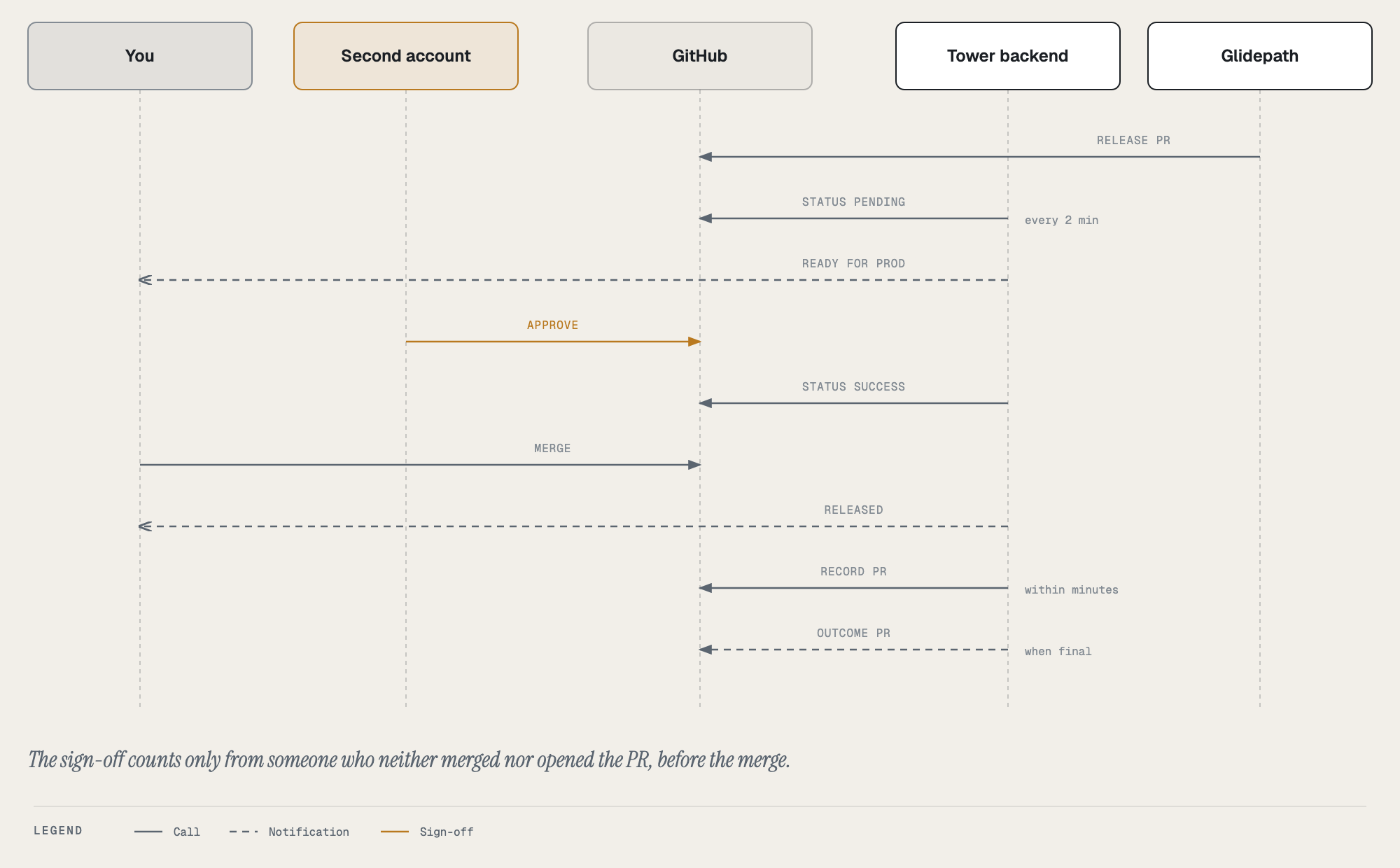
The record PR, which seals the draft, comes within a few minutes of the release being healthy in its first Flight environment; the outcome PR is hourly. Until the record PR is open, the draft editor says whose notes it holds (“IRONWOOD’s notes and owner”): the release has its name, but its notes have not moved yet.
A release PR to the sign-off environment ends in one of these sign-off states, shown in the record’s Release notes and sign-off panel:
| State | Meaning |
|---|---|
| awaiting | Open, no sign-off that counts yet (commit status pending) |
| approved | Open, with a sign-off that counts (commit status success) |
| signed | Merged with a sign-off that counts |
| self-approved | Merged, and the only approval came from the person who merged it |
| shipped without | Merged with no approval at all |
The last two raise the “Shipped without a sign-off” notification on a Hand-flown app.
The record’s Release notes and sign-off panel shows the notes the draft carried and the sign-off: from the record when it was written after the production PR merged, otherwise read live from the PR. The readiness score’s approval points come from sign-offs that count (+5 each, up to +10), and only from sign-offs the record carries: one read live from the PR is shown but does not move the score, so a record scores the same in the list, in Compare and when opened. The list also uses the guardrail results frozen in each committed record, the same ones the opened record falls back to.
After release is what people add once a release has shipped, through a PR to the record: how it was checked in production, follow-ups (incidents, fixes owed, anything learned) and acknowledgements, which earn nothing. The summary and risk are written in the draft, before the release ships, and shown in Release notes and sign-off. A record written before the draft carried them (schema v1) can still be given a summary and risk under After release; a summary or risk added that way to a newer record is shown in Release notes, marked “added after release”.
Tests and change request
Commit signature (2026-10-20, glidepath ADR-0027). The panel opens with how the released commit was proven, read
from the provenance gate’s evidence (the <!-- glidepath:signature --> line in its PR comment, which the backend
accepts only from the platform’s GitHub App, glidepath.gateCommentApps) and frozen into the record with its
guardrails:
| Proof | Chip | Line |
|---|---|---|
| gitsign | green gitsign | Signed by the email in the verified Sigstore certificate |
| GitHub merge, strict | green GitHub merge, strict | Merged by <login> in <repo>#<pr>; all N commits gitsign-signed |
| GitHub merge | green GitHub merge | Merged by <login> in <repo>#<pr> (GitHub’s key), with approvers when required |
| no evidence, gate passed | neutral not recorded | Sealed before the gate kept this |
| cloud target | neutral not required | Commit signing isn’t checked on a release pin (ADR-0020) |
A merge-path line carries a hint: the proof is GitHub’s signature and its record of who merged, not a personal key. A failed gate shows nothing here (the gate tiles show it). The same proof appears as a green chip on the record’s row, on the Next release and Live cards (“Commit: GitHub merge by jfillman”), in the pending-promotion task above them, and on each build’s row in the Release matrix (the line on hover and in the opened cell), and in the HTML/PDF export.
Then the check ride: the attested test run the qa release gate
read for this image, with its outcome, counts (passed, failed, skipped), the workflow’s source
(argocd:check-rides for the shared repository), its Testkube execution and when it finished, and whether its
attestation verified. It is frozen into the record when the record is sealed (with how many attested runs the image
carried then), so the record keeps saying what was true at release; before that it is read live from the image’s
provenance. A team’s own run that passed with no check ride, a ride not from the shared repository, or a passed
ride whose attestation didn’t verify is amber; a failed ride is red. The Images tab lists every attested run with a
download of the attestation document, and the Pipelines tab’s Tests view has the JUnit reports.
An app whose releases go through change management (Glidepath’s itsm wrapper: ServiceNow, a webhook, or none) gets a
Change request fact at the top of What happened: the change’s number linked to the ITSM record and its state
(created and awaiting approval, implementing, closed successful or unsuccessful, or implementing with a failed
deploy), plus the change that rolled it back when one did. The record list shows the same state as a chip beside the
outcome. The fact comes from Glidepath’s release-tracking record (changeRequest* keys) and is frozen into the
record with the rest of the evidence.
A release whose image was promoted to Flight (Glidepath ADR-0029) gets a Promoted to Flight fact under the change
request: when, whether the promoter’s attestation verified (public Sigstore, the promoter workflow’s identity), the
release PR it was promoted for, how many required gates were green, the promoter run, and the Ground image it was
copied from, who signed it (the promoter workflow) with a link to its public Rekor entry, and the attestation itself
(Promotion attestation opens the in-toto statement). Frozen into the record at sealing (promotion), read live
from the image’s provenance before. The
Images tab marks each digest in Flight or Ground only, and always lists the Ground package.
Outcome (what happened after it shipped)
Each record gets an outcome, decided in its sign-off environment from Glidepath’s release-tracking records:
| Outcome | When |
|---|---|
| clean | It ran healthy there and a newer release replaced it, or it stayed healthy for the whole 7-day bake window. |
| rolled back | A rollback release replaced it. The record names the release it rolled back to and the reason. |
| replaced before healthy | A newer release replaced it there before it ever went healthy. |
| stopped before production | It never reached production, and every environment it did reach moved on. |
Until it is final, a record shows its live state (rolling out, or baking · day 3 of 7). Once final, Tower’s
backend writes the outcome into the record with one PR per release (branch release-record-outcome-<app>-*,
excluded from the release gates like the record PRs themselves), together with the production sign-off when the
record was written before that PR merged (an app with staging before production). Glidepath sweeps its tracking
records after 14 days, so releases older than that, and cloud targets, have no outcome. SLO burn during the bake
window is not read yet: the production cluster’s Prometheus is on and canary analysis uses it, but the outcome is
still decided from the rollout alone.
The record’s score is now called readiness: how ready the release was when it shipped (guardrails, signed and attested, commit proof, sign-offs). Commit proof (2026-10-20) is worth up to 6: gitsign 6, GitHub merge strict 4, GitHub merge 2, nothing when not recorded or not required. It only adds points, so no older record’s score moved. The old “+5, no incidents” points are gone; Tower never tracked incidents, so every release got them. What happened afterwards is the outcome, shown beside the score, not folded into it.
GitHub Release (opt-in per release). Tick “Publish a GitHub Release” in the draft, and once the release is
healthy in production Tower creates v<version> at the image’s commit in the app repo, named after the release
(CEDAR · v1.9.0), with the draft’s notes as the body. It never moves a tag: if v<version> already tags another
commit (the version was not bumped), it publishes nothing and the record says why. A Release that already exists
for that tag at the same commit is linked, not recreated. The link reaches the record with the outcome PR.
Changelog. “Changelog” beside the Release records title lists every committed release’s notes, newest first.
Planning a release
- Target date and milestone in the draft make it a scheduled release. The draft card then lists the milestone’s open issues as Planned, and readiness gains Target date (late shows as a to-do) and Planned issues closed.
- Jira: set
tower.jira.baseUrlin app-config and Jira keys (BAG-12) in PR titles, bodies and branch names link to it, next to the GitHub issues. - Release calendar on the Ops Wall: every app’s next release by name, target date (late ones marked), owner, note count, what is on its way to production, and how its last release ended.
- Announcements: when a release PR to an app’s sign-off environment opens (“CEDAR is ready for prod”) and when it merges (“CEDAR released to prod”, with who signed off). They are Backstage notifications, in Tower’s Activity feed under Releases; no Slack integration is configured.
- Autoland eligibility under the mode bar: what an app would need before Autoland could land releases on its own (tests that report results, a canary rollout in production, production metrics, SLO burn read during the bake, at least five recorded outcomes with under 15% rolled back, and an average readiness of 80). “Tests report results” counts a release when its image carries a passed check ride (frozen into the record, or read live from provenance). “Production metrics” is met when production rolls out with a canary, since canary analysis reads the production cluster’s Prometheus. “SLO burn read during the bake” stays a to-do until Tower reads it. Display only; Autoland is not available yet.
Where it lives, and what runs on its own
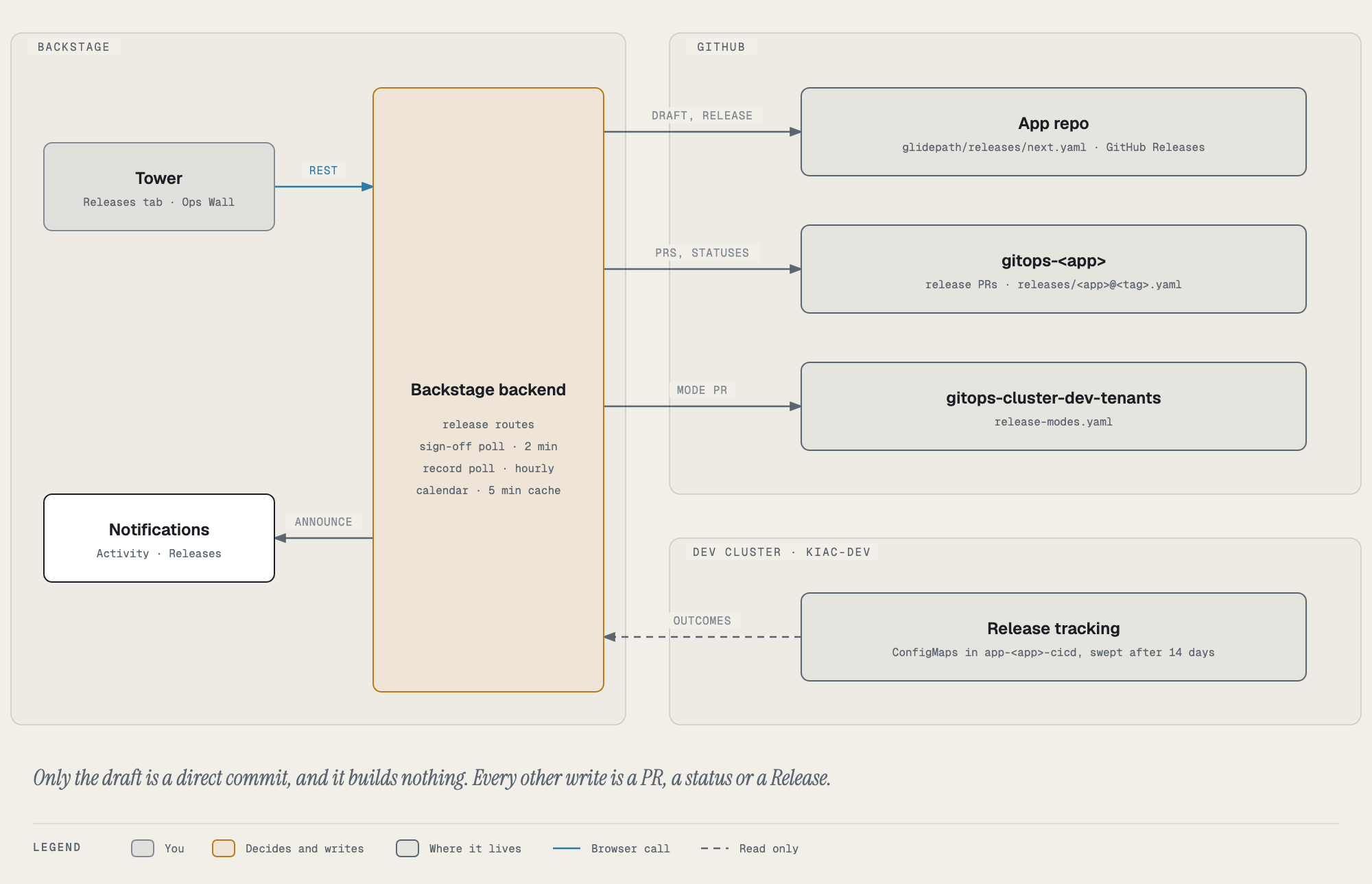
| Data | Where | Written by |
|---|---|---|
| The draft (notes, owner, risk, target date, milestone, GitHub Release opt-in) | glidepath/releases/next.yaml in the app repo |
Save in the draft editor: a direct commit, which builds nothing |
| Release mode per app | release-modes.yaml in gitops-cluster-dev-tenants |
Change in the mode bar (admins): a PR |
| The release record | releases/<app>@<tag>.yaml in gitops-<app> (cloud targets: glidepath/records/ in the app repo) |
The record poll: a PR on a release-record-* branch |
| Outcome, late sign-off, GitHub Release link | The same record file | The record poll: a PR on a release-record-outcome-* branch |
| Sign-off status | Commit status hangar/release-signoff on the release PR |
The sign-off poll |
| GitHub Release | v<version> in the app repo |
The record poll, once the release is healthy in production |
| Rollout state | release-tracking-* ConfigMaps in app-<app>-cicd on the dev cluster |
Glidepath (read only here); swept after 14 days |
The backend runs three scheduled tasks, one replica at a time:
| Task | Every | Does |
|---|---|---|
release-signoff-poll |
2 minutes | Sets the sign-off status on each open Hand-flown release PR to the sign-off environment; announces “ready” when such a PR opens and “released” when it merges, for every app; raises “Shipped without a sign-off”. A restart does not announce history: each app’s PRs are snapshotted the first time the poll sees the app. |
release-record-poll |
hour | Opens the record PR once the first Flight environment is healthy; publishes the opted-in GitHub Release; opens the outcome PR once the outcome is final. An open PR is reused, never duplicated. |
release-record-seal-poll |
2 minutes | The record PR alone, so a release’s draft is sealed into its record (and next.yaml cleared) within a few minutes of it being healthy in its first Flight environment. Plans are cached for an hour and recorded releases remembered, so a quiet tick makes no GitHub calls. |
The Release calendar is computed on request and cached for five minutes.
Routes (all under /api/glidepath, Backstage’s backend):
| Route | Permission |
|---|---|
GET /release-records, GET /release-record |
signed in |
GET /release-draft, POST /release-draft |
tower.release-record.edit to save (owners) |
GET /release-mode, POST /release-mode |
tower.release.mode to change (admins only) |
GET /release-signoff, GET /release-planned, GET /release-calendar |
signed in |
Release names
Every release gets a tree name, in order per app, the way hurricanes are named: ASPEN, BIRCH, CEDAR, DOGWOOD…
(U, V and X are skipped; after the last name the list starts again with a numeral, ASPEN II). The first letter shows
where a release falls in the app’s history. Names are a different word family from image slugs (lowercase
adjective-animal pairs like amber-finch), so “CEDAR, shipped as amber-finch” reads unambiguously: people talk
about the release, the slug says which build went out.
A name is a release’s position in the app’s committed records (GET /api/glidepath/release-records), so it never
changes. A release whose record PR is still open is counted too. A release that reached Flight but never got a
record is shown without a name, since counting it would rename every later release once it leaves Tower’s window.
Names show only once that history has loaded.
Flight environments
When an app has more than one Flight environment (staging, pre-prod, prod), each record shows how far its image got: ● live there now, ✓ was deployed there, ○ never reached it.
Which PRs belong to a record
A record’s PRs are the ones merged after the previous release’s commit landed on main, up to its own. “Landed” is the merge time of the PR whose merge commit the image was built from, else the build run’s start, else the image’s first deploy. The draft uses the same boundary, so a PR is never in both.