
Docs · Glidepath
Cloud deploy identity (AWS)
How Glidepath’s deploy step reaches AWS without a stored key, written for someone new to it. The infrastructure
side (the roles, the issuer, the permissions boundary) lives in Airframe’s docs/admin/cloud-credentials.md; this
page covers what Glidepath does.
In one paragraph
Lambda and ECS deploys used to log in to AWS with an access key the app kept in Infisical: a password for a machine
that worked from anywhere until someone deleted it, shared by every app. Now the deploy step proves who it is with a
short-lived token Kubernetes signs for it, and AWS swaps that token for one hour of access to one IAM role made for
what it deploys: glidepath-deploy-<functionName> for a Lambda function, glidepath-deploy-ecs-<service> for an
ECS service. Each can push only to its own image repository and update only its own function or service. Nothing
is stored, and one app’s pipeline can’t touch another app’s function or service.
How a deploy gets its access
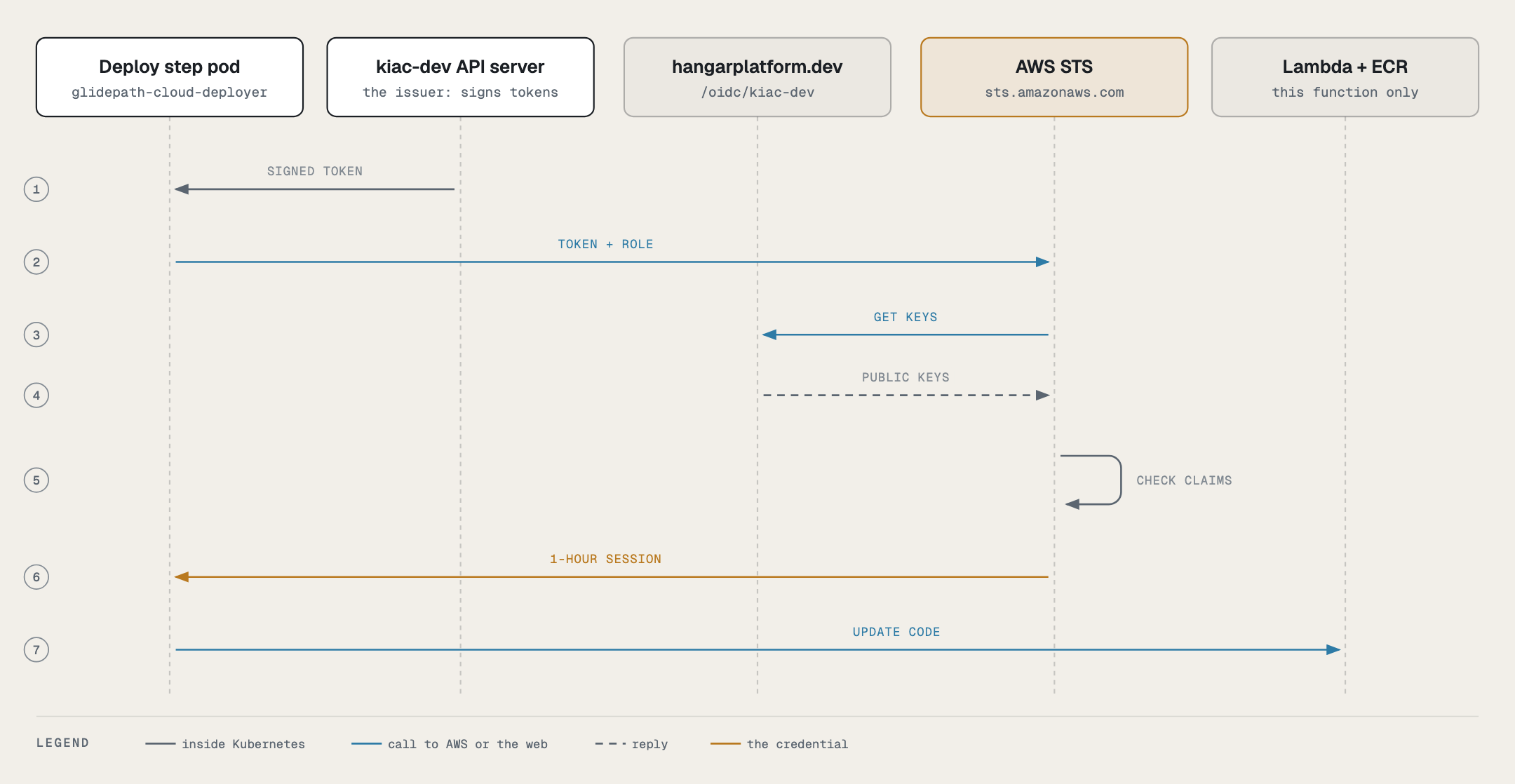
- The deploy step’s pod runs as the ServiceAccount
glidepath-cloud-deployer. Kubernetes writes a token for it into the pod at/var/run/secrets/aws-web-identity/token, addressed tosts.amazonaws.comand valid for an hour (it is replaced before it expires). - The step sets
AWS_ROLE_ARNandAWS_WEB_IDENTITY_TOKEN_FILE. The AWS command-line tool sees them and trades the token for credentials on its own; no step calls STS by hand. - AWS checks the token against the dev cluster’s published keys (its registry
serviceAccountIssuer, e.g.https://<issuer-host>/oidc/<dev-cluster>) and against the role’s trust policy, which names exactly this namespace and ServiceAccount. - The step copies the image into the target’s ECR repository and updates the function, or registers a new task definition and updates the service.
The pieces, and who owns each
| Piece | What it is | Where it comes from |
|---|---|---|
ServiceAccount glidepath-cloud-deployer |
The only identity an app’s deploy role trusts. No RBAC; its Kubernetes API token isn’t mounted. | glidepath-app chart, templates/identity/cloud-deployer.yaml |
ConfigMap glidepath-cloud-identity |
awsAccountId, so the step can name the role without a cicd.yaml field |
the same template |
cloudIdentity.awsAccountId |
Turns both on | forwarded by the control plane’s tenant-onboarding ApplicationSet from clusters.yaml (aws.accountId) |
| Running the deploy tasks as that ServiceAccount | taskRunSpecs entries for deploy-aws-lambda and deploy-aws-ecs, each with serviceAccountName: glidepath-cloud-deployer |
the deploy stage’s TriggerTemplate (flow-triggers.yaml), and promote flows generated by deliver-onboarding-files |
| The login | glidepath-catalog.awsCredentials in charts/glidepath-catalog/templates/_helpers.tpl: each credential-using step of deploy-lambda and deploy-ecs calls aws_credentials "<role name>" |
the catalog |
The role glidepath-deploy-<functionName> |
Created and deleted with the function | Airframe’s AwsLambdaTarget |
The role glidepath-deploy-ecs-<service> and the ECR repository <service> |
Created and deleted with the service | Airframe’s AwsEcsTarget |
| Who may run as the ServiceAccount | Four admission policies | gitops-cluster-dev 30-policy/kyverno-policies/glidepath-cloud-deployer.yaml |
Only the deploy Pipeline contains deploy-aws-lambda and deploy-aws-ecs (both always, each run only for its
target), and Tekton refuses a taskRunSpecs entry that names a task its Pipeline lacks. That is why the entry is added only for the deploy stage, and only to flows rooted at deploy.
A promote flow picks it up at the next onboarding resync.
How the step gets its access
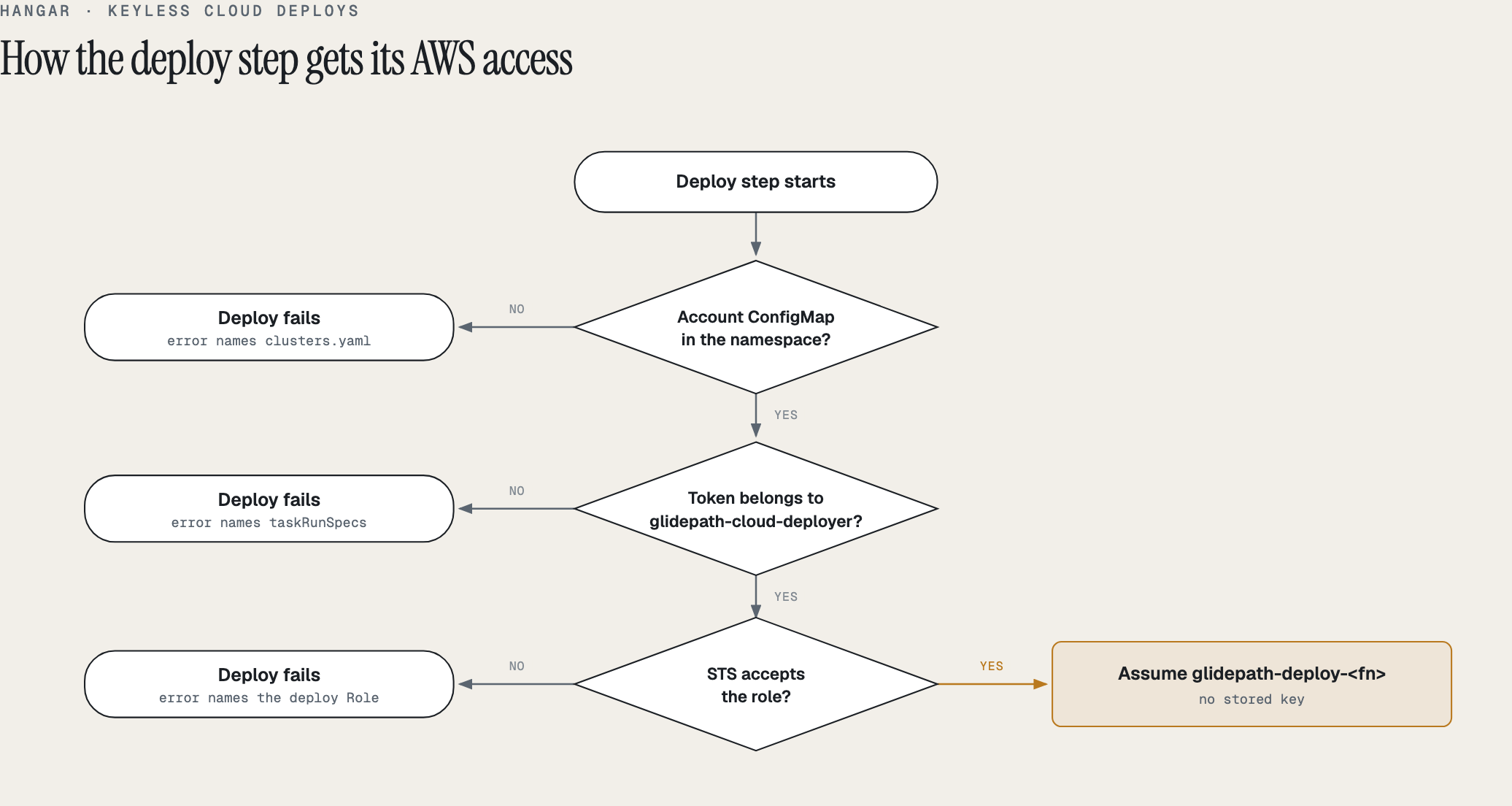
The step checks three things in order: the namespace has glidepath-cloud-identity, the pod’s token belongs to
glidepath-cloud-deployer, and STS accepts the role. If all hold it assumes the role; if one fails, the deploy stops
with an error that names the missing piece and its fix. There is no other way in: a key in app-secrets is not
read, and neither deploy-lambda nor deploy-ecs mounts app-secrets at all. A successful run logs:
credentials: assuming arn:aws:iam::700017004810:role/glidepath-deploy-glidepath-smoke-fn (web identity, no stored key)
credentials: assuming arn:aws:iam::700017004810:role/glidepath-deploy-ecs-smoke-ecs-dev (web identity, no stored key)
Why there used to be a fallback, and why it’s gone. Until phase 4 the step fell back to the app’s
aws-access-key-id/aws-secret-access-key when it couldn’t assume the role. That covered the switch: a deploy that
ran before its function’s role existed (the role is created a reconcile after the registry names the account) would
otherwise have failed. Once every Lambda app had deployed through its role, and no Secret on either cluster still
held an AWS key, the fallback was code that could only ever hand a deploy a long-lived key again, so it was removed
(2026-10-16). ECS followed the same day without a fallback: it had never used a key under web identity.
charts/glidepath-catalog/tests/aws_credentials_test.sh runs every login step of both Tasks through its real call
line, including “never reads a stored key”.
ECS: why the image goes to ECR
Fargate can pull from ghcr.io, but only from a public package unless every task definition carries a Secrets
Manager secret with registry credentials. The platform’s packages are private by default (the first ECS run in
October needed its package made public by hand). So deploy-ecs copies the image into the ECR repository the
AwsEcsTarget creates, named after the service, where the task’s execution role can always pull it, and registers
the task definition with that ECR digest. The copy keeps the digest, so the signatures and attestations on ghcr.io
still verify the deployed image. ECS accepts a multi-architecture image index, so the whole image-ref is copied
(Lambda needs a single-architecture image and copies the -arm64/-amd64 tag instead).
Why it is built this way
- A dedicated ServiceAccount, not
pipeline-runner. Every pipeline step runs aspipeline-runner, including build and test steps that run the app’s own code. Trusting it would give the test suite AWS access. - Admission by creator, not labels. A PipelineRun’s labels are copied onto its TaskRuns and pods, so a label check
could be forged by an inline task. The policies check who created the pod, TaskRun or Job, which Kubernetes records
and a client can’t fake, and refuse a PipelineRun that gives the ServiceAccount to anything but the catalog’s
deploy-aws-lambdaanddeploy-aws-ecs, or that carries pod-templateenv(aBASH_ENVwould run code inside the deploy step). - No
cicd.yamlchange. The account comes from the platform. A schema change would have meant a toolbox rebuild (known gap 35) and one more value every app could get wrong. - The role is per function. CloudTrail names the function and the TaskRun on every call, and one app can’t reach another’s function.
Checking it
NS=app-<app>-cicd
kubectl -n $NS get sa glidepath-cloud-deployer
kubectl -n $NS get configmap glidepath-cloud-identity -o jsonpath='{.data.awsAccountId}'
# the deploy TaskRun's ServiceAccount and its credential line
TR=$(kubectl -n $NS get taskrun -l tekton.dev/pipelineTask=deploy-aws-lambda --sort-by=.metadata.creationTimestamp -o name | tail -1)
kubectl -n $NS get $TR -o jsonpath='{.spec.serviceAccountName}'
kubectl -n $NS logs "$(kubectl -n $NS get $TR -o jsonpath='{.status.podName}')" -c step-prepare | grep credentials| Symptom | Cause | Fix |
|---|---|---|
error: no AWS account for cloud deploys in this namespace |
The ConfigMap glidepath-cloud-identity is missing |
The cluster’s clusters.yaml entry needs aws.accountId; check cloudIdentity reached the app (Argo CD <app>-cicd) |
error: this step is not running as glidepath-cloud-deployer |
The run didn’t give the ServiceAccount to deploy-aws-lambda / deploy-aws-ecs |
For a promote flow, run the onboarding resync; don’t hand-edit taskRunSpecs |
error: could not assume … AccessDenied |
The role doesn’t exist yet, or its trust names another namespace | Check the target’s <xr>-deploy Role is Ready; a function or service without an AwsLambdaTarget / AwsEcsTarget has no role |
error: no ECR repository '<service>' |
The ECS service has no AwsEcsTarget, or its repository isn’t created yet |
Check the target’s ecr-repository is Ready |
InvalidIdentityToken |
AWS can’t fetch or verify the dev cluster’s keys | curl <serviceAccountIssuer>/jwks.json; after a cluster rebuild, re-publish the cluster identity (Apron clusterIdentity) |
A PipelineRun is refused by glidepath-cloud-deployer-pipelineruns |
It gives the ServiceAccount to the wrong task, run-wide, or with pod-template env |
Use the generated flow; don’t hand-edit taskRunSpecs |
Not covered yet
- Azure Container Apps uses a stored service principal secret; the same pattern applies through Azure workload identity federation.